 Moolish
Part 8 of 8 in TD Sequential
Learn · TD Sequential
TD Sequential TradingView scripts: how to find and read them
Last updated:
On TradingView, TD Sequential comes from scripts: DeMARK’s own paid DeMARK 9-13 and free or paid scripts from independent authors. You open the Indicators dialog, search for it, and read the script’s description to learn which rules it uses. Scripts count slightly differently, so two charts can disagree about the same bars.
This page is a neutral guide to finding TD Sequential on TradingView, reading what a script does, and knowing what alerts there can and cannot do. TradingView facts come from its public pages, read on 28 October 2026 and listed with dates at the end. TradingView changes often, so check the pages yourself. For the method itself, see what TD Sequential is.
Moolish is not affiliated with, endorsed by or sponsored by Tom DeMark or DeMARK Analytics, or by TradingView. TD Sequential, TDST and TD Perfected Setup are terms from DeMARK’s method. Moolish’s own implementation of the counts is called Sequencer 9-13.
How to find TD Sequential on TradingView
- Open a chart and click the indicators button on the top toolbar. TradingView’s help calls the window “Indicators, metrics, and strategies”.
- Search for “TD Sequential” or “DeMARK”.
- Look through the community scripts in the results. TradingView labels published scripts open-source, protected or invite-only, so the label tells you whether the author has shared the code.
- Open the script’s page and read the description before adding it. Look for how it counts the setup, the countdown and perfection.
- Add it to the chart and compare a few completed 9s with the rules in the description.
Skipping the description is the usual reason a chart looks “wrong” later.
What kinds of scripts exist
| Kind | Example from the sources | What to check |
|---|---|---|
| Paid script from DeMARK | DeMARK 9-13 is available only to DeMARK 9-13 subscribers. It plots Setup and Countdown counts, TDST lines, Perfected Setups and Risk Levels. | The page states no price and no alerts, so ask before subscribing. |
| Community script | Independent authors publish scripts as open-source, protected or invite-only. | Whether the author documents the rules, and whether you can read the code. |
| Code you paste yourself | A GitHub repository offers a Pine Script version with a Setup Phase to 9 and a Bonus Phase from 10 to 13. | Its accuracy was not checked. Compare its counts with the method you want to read. |
The last row shows why reading descriptions matters. A script that calls the second phase a “Bonus Phase” uses different words from the method’s own countdown. That does not make it wrong, but you cannot assume it follows the rules in the countdown explainer.
Why two scripts show different counts
Each script is its author’s reading of the method, and public descriptions leave room. These are the usual places two scripts diverge.
- The price flip. Some scripts wait for a flip before bar 1, some start counting at the first qualifying close.
- Strict or equal. Some require a close strictly beyond the reference bar, some accept an equal value.
- Perfection. The bar 8 or 9 test has variants, covered in the perfected setup explainer.
- The 13-versus-8 test. Whether a 13 must also pass a comparison with countdown bar 8 changes which 13s are shown.
- Combo mixed in. DeMARK 9-13 covers both Sequential and Combo countdowns. The Combo comparison explains how they differ.
- Bar boundaries. A daily bar can end at a different hour on a different feed, so a count can be one bar off.
- Levels. How TDST lines are anchored and qualified varies, see TDST explained.
When counts disagree, find out which of these differs before you decide which chart to trust.
Alerts and limits on TradingView
An indicator draws the count on the chart you have open. Whether it can alert you is a separate question.
- Alerts can use indicator plots. TradingView says alerts can be created on data series, indicator plots, strategy orders and drawing objects. Alerts on studies depend on the interval, and changing an indicator’s settings after you create the alert leaves the alert on the old settings.
- The script matters. What you can alert on depends on what the script exposes. The DeMARK 9-13 page does not mention alerts.
- Plans cap active alerts. The pricing page lists active price alerts of 3 on the free Basic plan, then 20, 100, 400 and 1,000 on the paid plans. Active technical alerts, the kind on indicators, are listed from the first paid plan up at 20, 100, 400 and 1,000, with no number shown for Basic. Check the current page before you plan around these.
Watching many markets for one condition through alerts means creating and managing many alerts inside those caps.
Where a scanner fits
A TradingView script is a good tool for reading one chart: you can see every count, adjust settings and, if the code is open, read it. It is a poor fit for the question “which markets completed a 9 on the last closed bar?”, because that needs the same check on every market.
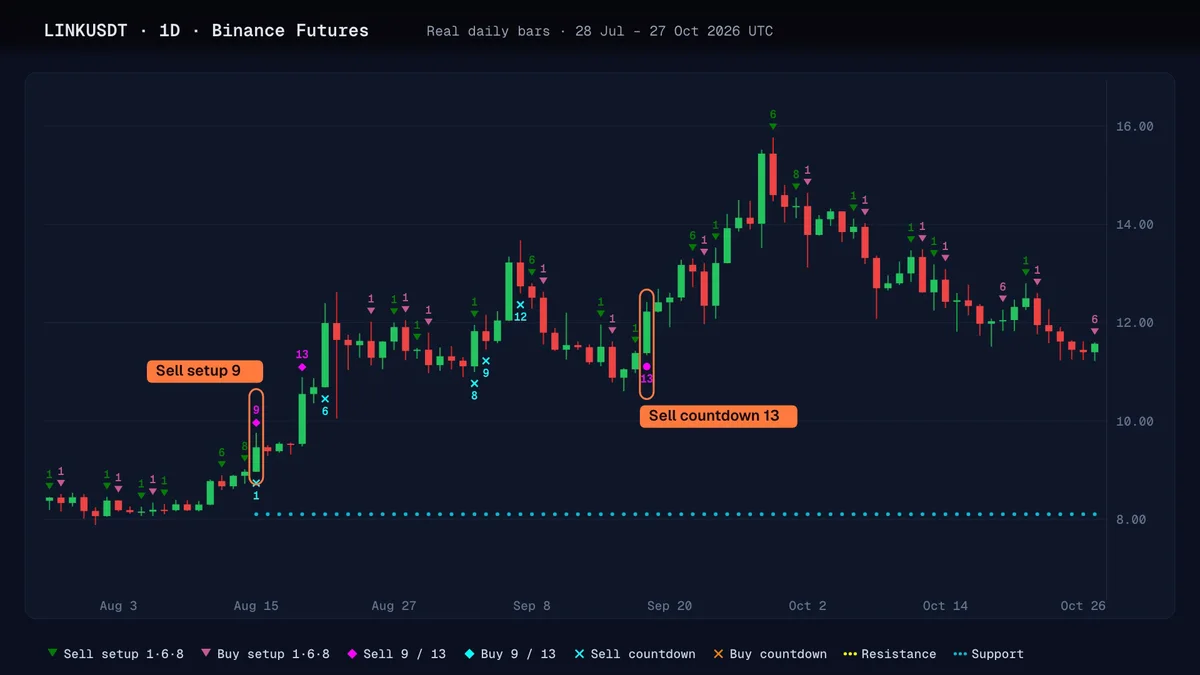
That is the job of a scanner. Moolish scans 1,600+ crypto markets for TD Sequential counts on ten timeframes from 15M to 3M, detects each one on the closed bar and can send a Telegram alert. It is not a charting platform, and TradingView is the stronger place to draw and write scripts. The free vs paid screener comparison lays out the options, and the Moolish vs TradingView alerts page compares alerts.
To use the scanner, sign up for the free 7-day trial (no credit card). To check how a symbol’s counts should look, the free TD Sequential count checker runs in your browser, and you can compare its numbers with a script you are testing.
A short checklist before you trust a script
- Does the description state its setup, countdown and perfection rules?
- Is the code open, so you can read it?
- Do three completed 9s on a chart you know match your hand count?
- Does it say anything about alerts?
- Does its bar boundary match the tool you will compare it with?
Nothing on this page is financial advice. A script draws a count, and the count is not a forecast. Trading crypto carries a high risk of loss.
FAQ
Is there a TD Sequential indicator on TradingView?
Yes, as scripts. DeMARK publishes the paid DeMARK 9-13, and independent authors publish community scripts, some open-source. Search the indicators window for “TD Sequential” or “DeMARK” and read each description, because the available list changes.
How do I add TD Sequential to a TradingView chart?
Open the indicators window from the top toolbar, search for TD Sequential or DeMARK, and open a community script. Read its description for the rules it uses, then add it to the chart. Compare a few completed 9s with your own count before relying on it.
Why does TD Sequential look different on TradingView than on another platform?
Each script is its author’s reading of public rules. They can differ on the price flip, strict or equal comparisons, perfection, the 13-versus-8 test and bar boundaries. Find which choice each tool makes before deciding that one chart is wrong.
Can TradingView alert me when a TD Sequential 9 completes?
It can alert on indicator plots, so it depends on what the script exposes and on your plan’s cap on active alerts. The DeMARK 9-13 page does not mention alerts. Read the script description and the current pricing page.
Is the TradingView DeMARK 9-13 script free?
No. It is available only to DeMARK 9-13 subscribers, and the page we read states no price. It plots Setup and Countdown counts, TDST lines, Perfected Setups and Risk Levels.
Sources
Read from each public page on the date shown. Check the page itself before you decide, because products and prices change.
- https://www.tradingview.com/script/gVMuxasg-DeMARK-9-13/, checked October 28, 2026. DeMARK 9-13, published by DeMARK, is available only to DeMARK 9-13 subscribers. It plots Setup counts, Sequential and Combo Countdown counts, TDST lines, Perfected Setups and Risk Levels, and says its indicators are not trading systems. Price and alerts are not stated on the page.
- https://in.tradingview.com/support/solutions/43000558522-tell-me-more-about-the-community-scripts, checked October 28, 2026. TradingView's help article says community indicators are found in the 'Indicators, metrics, and strategies' dialog on the upper toolbar or in the Community Scripts section, and that published scripts are open-source, protected or invite-only.
- https://www.tradingview.com/support/solutions/43000595315-how-to-create-alerts/, checked October 28, 2026. Alerts can be created on data series, indicator plots, strategy orders and drawing objects; alerts on studies depend on the interval, and changing an indicator's parameters after creating the alert leaves the alert on the old settings. The page states no plan limit.
- https://www.tradingview.com/pricing/, checked October 28, 2026. Basic is free with no credit card. Active price alerts: Basic 3, Essential 20, Plus 100, Premium 400, Ultimate 1,000. Active technical alerts on indicators, strategies and drawings are listed from Essential (20, 100, 400, 1,000); no number is shown for Basic.
- https://github.com/Forte11Cuba/TD-Sequential-Tom-DeMark, checked October 28, 2026. A GitHub repository of a Pine Script TD Sequential with a Setup Phase (1 to 9) and a Bonus Phase (10 to 13). Its accuracy was not checked.
Ask an AI to check this page