 Moolish
Free tool
TD Sequential counter: check the 9 and 13 on any crypto pair
Last updated:
Pick an exchange, a symbol and a timeframe, and this free checker shows the current TD Sequential count: the setup number, the countdown, the last completed 9 and 13, and the active support and resistance. It reads closed bars only, runs in your browser and needs no account. Some traders call it a TD Sequential calculator or a TD9 checker; it does the same job.
The checker needs JavaScript. With it switched on you can choose an exchange, type a symbol such as BTCUSDT and read the current count. Without it, the sections below still explain every number the tool shows.
How to use the TD Sequential counter
- Choose the exchange and the market, spot or futures.
- Type a symbol such as BTCUSDT and pick it from the list, then choose a timeframe.
- Press Check count. The reading and the chart appear in a few seconds, and the page address keeps your choice so you can share it.
How to read the TD Sequential result
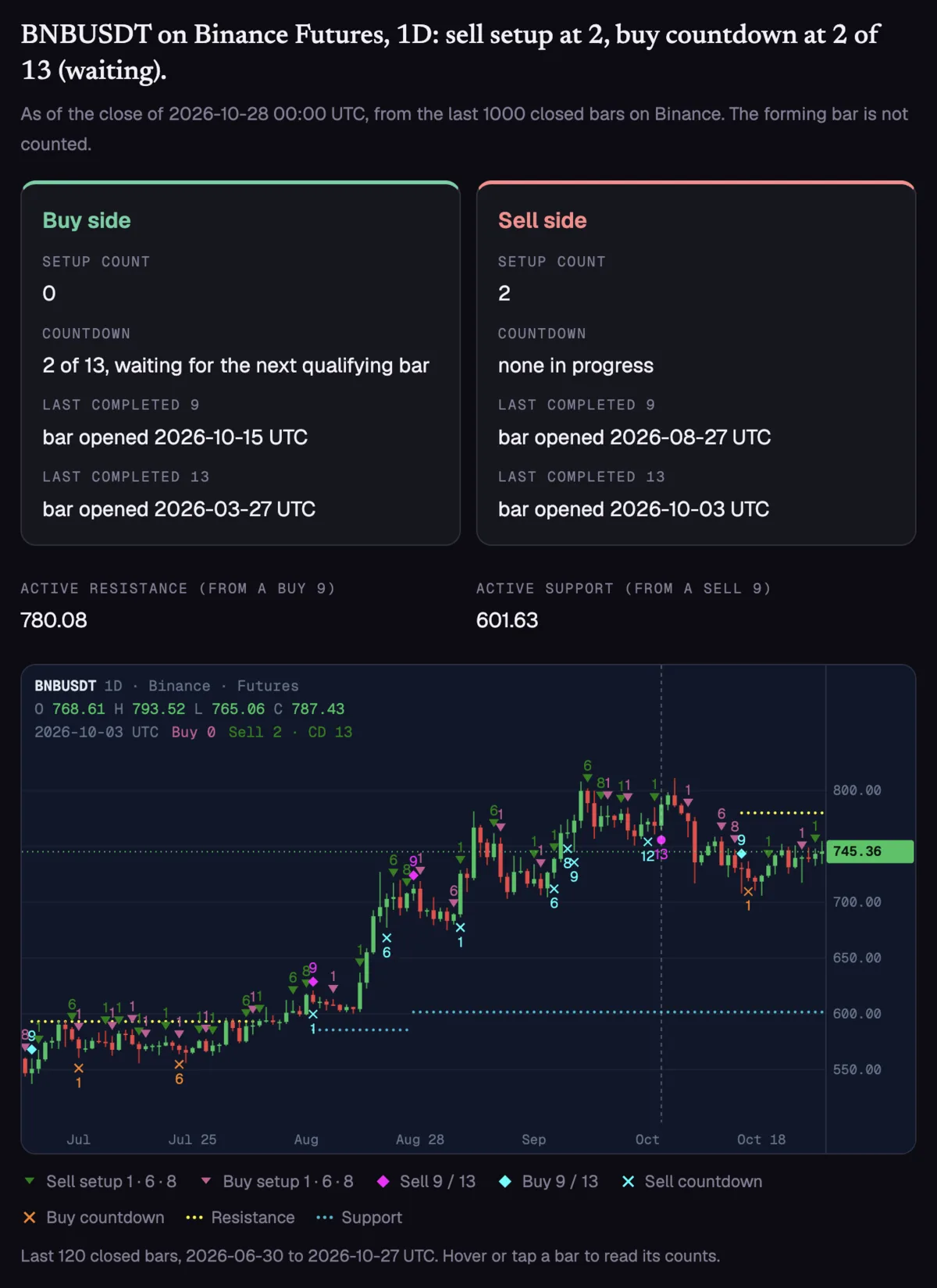
The result is a snapshot of the last closed bar.
| Line | What it tells you |
|---|---|
| Setup count | How many consecutive bars have closed below (buy) or above (sell) the close four bars earlier. A 9 completes the setup, and the count keeps rising if the run goes on. |
| Countdown | The second phase, from 1 to 13, which starts when a setup completes. “Waiting” means the last bar did not qualify, so the number is held. |
| Last completed 9 and 13 | The open time of the bar where the most recent setup 9 and countdown 13 finished, on each side, within the bars loaded. |
| Active resistance and support | The high or low of the last completed setup, kept until a close or a whole bar moves beyond it. |
The chart under the numbers draws the last 120 closed bars (60 on a phone) in the same style as the Moolish chart. Setup counts sit above the bars at 1, 6, 8 and 9, countdown counts below them at 1, 6, 8, 9, 12 and 13, and dotted lines mark support and resistance. Hover or tap a bar to read its counts. The phases are explained in the TD Sequential guide, the TD9 page and the Countdown 13 page.
Closed bars only
A candle that is still forming changes with every trade and can flip a count back and forth. The checker drops it and says “as of the close of” the time the last counted bar ended, in UTC. Daily bars open at 00:00 UTC and weekly bars open on Monday at 00:00 UTC.
Only timeframes that the exchange offers natively and aligns to UTC are listed, so a week on one exchange is the same week elsewhere. That is why some exchanges show fewer timeframes. The 2-day, 3-day, 2-week, 3-week and 3-month timeframes are left to the Moolish scanner, which covers ten timeframes from 15M to 3M.
Why your TD Sequential count may differ from your chart
Two tools can show different numbers for the same candle. The usual causes:
- A different first bar. A count depends on where the history starts. This tool loads up to about 1,000 closed bars, and fewer where an exchange offers less.
- Different bar boundaries. A day that ends at midnight UTC and a day that ends at another hour are different bars.
- Different rule variants. Some scripts require a price flip before a setup, or add perfection and other conditions. This tool follows the plain setup, countdown and level rules and nothing more.
The longer explanation is in why TD Sequential counts differ between tools. The counting code is open: it is published under the MIT licence in the td-sequential repository, with the written rules and test cases.
What this tool does not do
It checks one symbol at a time. It does not alert you, search past signals or rank markets, and it does not tell you what to trade.
FAQ
Is the TD Sequential counter free?
Yes. It needs no account and no payment, and it runs in your browser. It checks one symbol at a time. Scanning every market and Telegram alerts are part of the Moolish app.
Which exchanges and markets does it support?
Binance (spot and futures), Bybit (spot and futures), OKX (spot and futures), Gate (spot and futures), Bitget spot, Crypto.com (spot and futures), Coinbase, Kraken and Bitstamp. Timeframes vary by exchange, and only those aligned to UTC are shown.
Does the tool send my searches to Moolish?
No market data passes through Moolish. Your browser requests candles directly from the exchange you chose, so that exchange sees the request. The symbol and timeframe are kept in the page address so you can share a reading.
Why does the tool say my exchange is blocked?
Some exchanges refuse requests from certain countries or networks and answer with an HTTP 451 or 403 error. Choose another exchange, or try again without a VPN.
Why is the forming bar left out?
The bar that has not closed can still change, so a count that includes it can change too. With closed bars only, the reading holds until the next bar closes.
Does a completed 9 or 13 mean the price will turn?
No. A 9 or a 13 marks a stretched run of closes by a fixed rule. It gives no direction and no timing, and price can keep going past it.
Moolish is not affiliated with, endorsed by or sponsored by Tom DeMark or DeMARK Analytics. TD Sequential is a method created by Tom DeMark, and DeMARK is a trademark of DeMARK Analytics.
This tool is for education and is not financial advice. Trading crypto carries a high risk of loss.
Ask an AI to check this page