 Moolish
Guides
TD Sequential crypto scanner: scan setups and countdowns on every timeframe
Last updated:
A TD Sequential crypto scanner watches many markets at once and tells you when the TD Sequential count reaches a signal you care about, such as Buy Setup 9 or Buy Countdown 13, so you do not have to page through charts. Moolish scans both phases of the count on ten timeframes and can combine them with volume and candle conditions on other timeframes.
What TD Sequential is
TD Sequential is a bar-counting method, usually credited to Tom DeMark, that tries to mark where a trend may be running out of steam. It does not forecast a price. It counts closed bars against earlier closes and raises a flag when a run of bars has gone on for a defined length. Traders read the flag as a prompt to look at the chart, not as a command.
The method has two phases that run one after the other. The first is the setup, which counts to 9. The second is the countdown, which counts to 13 and can only begin after a setup has completed. Most of the vocabulary traders use, “TD9”, “the 13”, “a perfected nine”, comes from these two counts.
Setup versus countdown
The two phases look similar on the chart, because both put small numbers under the bars, but they behave differently. A setup is strict: the bars must be consecutive. A countdown is patient: the bars only have to meet a condition and can be separated by bars that do not.
| Aspect | Setup | Countdown |
|---|---|---|
| Counts to | 9 | 13 |
| Starts when | A run of closes begins that is lower (buy) or higher (sell) than the close four bars earlier | A setup has completed |
| Bars must be consecutive | Yes. One bar that breaks the run resets the count | No. Qualifying bars can be separated by other bars |
| Typical duration | Nine bars at the shortest | Usually much longer than the setup |
| Names in Moolish | Buy Setup 9, Sell Setup 9 | Buy Countdown 1, Buy Countdown 13, Sell Countdown 1, Sell Countdown 13 |
How the 9 is counted
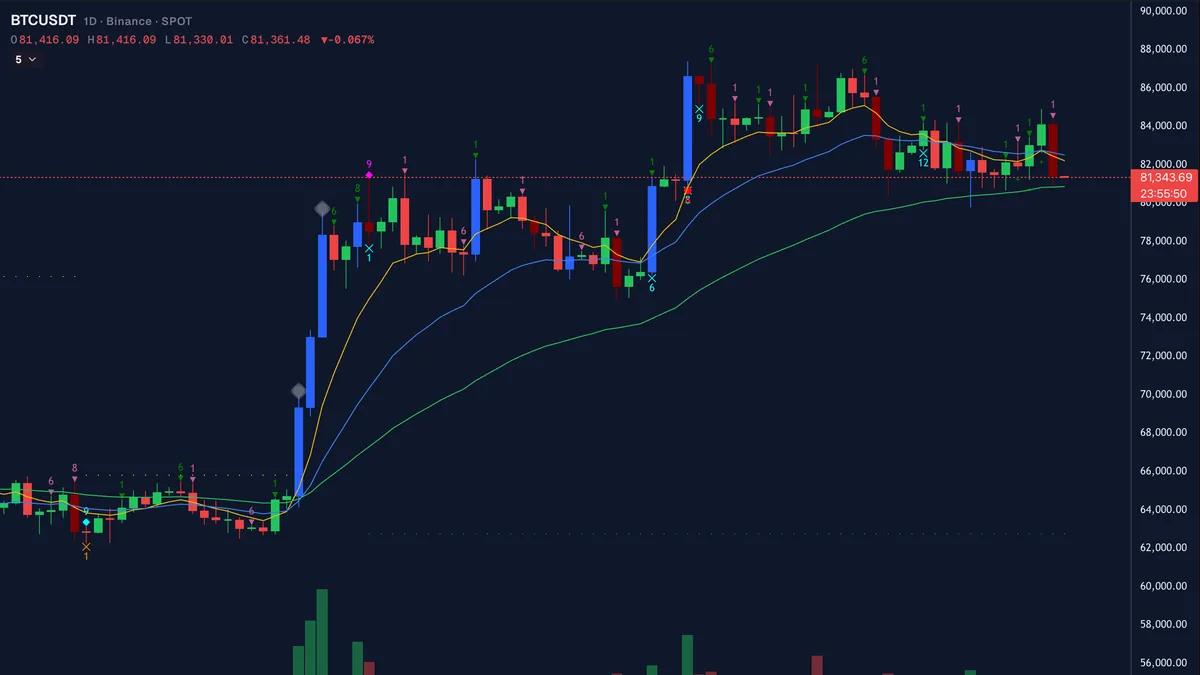
For a longer walk-through of the setup, see the TD9 indicator explainer. For a buy setup, each bar must close lower than the close four bars before it. When nine bars in a row do that, the ninth completes the setup and the event Buy Setup 9 is recorded. A sell setup is the mirror image: nine consecutive closes, each higher than the close four bars earlier, ending in Sell Setup 9. DeMark’s description places a price flip before bar 1: one close above the close four bars earlier, then the first close below it starts the count. Sequencer 9-13 counts from the first qualifying close and resets on the first bar that fails; it does not wait for a separate flip bar.
A buy setup is called perfected when the low of bar 8 or bar 9 is below the lows of bars 6 and 7 (DeMARK’s word is “exceeded”; some tools also accept an equal low). A sell setup is perfected when the high of bar 8 or bar 9 is above the highs of bars 6 and 7 (some tools also accept an equal high). Moolish reports the count and has no separate perfected label, so check perfection on the chart (see perfected setup).
Moolish also records the earlier numbers. Sell Setup 1 and Sell Setup 6 are events in the picker, and so is First Sell Setup 6. They are numbered by the bar’s position in the current setup count, so a Setup 6 is the sixth bar of a run that may or may not reach nine. A Setup 6 is a reason to start watching, not a completed signal.
How the 13 is counted
For a longer walk-through of the countdown, see the TD Countdown 13 explainer. Once a setup has completed, the countdown begins. Bar 9 of the setup can itself be countdown bar 1 when its close passes the countdown test; Sequencer 9-13 counts it that way. A buy countdown counts bars whose close is at or below the low of the bar two bars earlier. The count does not need consecutive bars, so it can run for many days on a daily chart. The first counted bar is Buy Countdown 1 and the thirteenth is Buy Countdown 13. A sell countdown mirrors the rule with closes at or above the high two bars earlier.
Textbook TD Sequential adds one more test to the final bar of the countdown. If the thirteenth bar does not meet that qualifying rule, the count is not a clean 13. Moolish lists Non-qualified Buy 13 and Non-qualified Sell 13 separately from Buy Countdown 13 and Sell Countdown 13, so the two cases are not mixed. Open each one in the picker to read its exact rule.
A countdown can also be cancelled before it finishes, for example when a new setup in the opposite direction completes. That is why a 13 is a much rarer event than a 9.
How Moolish scans it
The Sequencer 9-13 method is Moolish’s TD Sequential scanner. Its signals fall into three families: TD Setup, TD Countdown, and Support and resistance. It runs on ten scan timeframes, from 15M up to 3M, across the 1,600+ crypto markets Moolish covers. A scan runs on one exchange at a time, Binance, Bybit or OKX, with Spot, Futures or both. The method is free to subscribe to. To look at one symbol on any major exchange without an account, use the free TD Sequential counter.
| Group | Timeframes | Typical use |
|---|---|---|
| Intraday | 15M, 4H | Triggers and confirmations inside a day |
| Daily and multi-day | 1D, 2D, 3D | The setups most traders watch closely |
| Weekly | 1W, 2W, 3W | Slow context and swing-level setups |
| Monthly | 1M, 3M | Very slow signals that fire rarely |
The chart in Moolish shows 16 timeframes, including 30M, 1H and 2H, but those three are chart-only. The scanner and Chains use the scan timeframes above.
Every signal is detected on the closed bar. A Buy Setup 9 that looks complete halfway through a daily bar is not recorded until that bar closes, so an alert you receive does not disappear afterwards. For method events such as these, the Telegram alert goes out right after the bar closes.
The Sequencer 9-13 signals
These are the eight signals shown on the method page, with the names exactly as they appear in the app.
| Signal | Family | What it records |
|---|---|---|
| Buy Setup 9 | TD Setup | Nine consecutive closes each lower than the close four bars earlier |
| Sell Setup 9 | TD Setup | Nine consecutive closes each higher than the close four bars earlier |
| Buy Countdown 1 | TD Countdown | The first counted bar of a buy countdown after a completed buy setup |
| Buy Countdown 13 | TD Countdown | The thirteenth counted bar of a buy countdown |
| Sell Countdown 1 | TD Countdown | The first counted bar of a sell countdown after a completed sell setup |
| Touch Support | Support and resistance | A bar that reaches the support level the method is tracking |
| Break Resistance | Support and resistance | A close through the resistance level the method is tracking |
| Break resistance after touch | Support and resistance | A break of resistance that follows an earlier touch of that level |
The picker contains more names than these eight. They are listed below by family. Open a signal in the picker to read its exact rule before you rely on it.
| Group | Names |
|---|---|
| Setup | Sell Setup 1, Sell Setup 6, First Sell Setup 6, Buy Setup 13, Sell Setup 13 |
| Countdown | Sell Countdown 13, Non-qualified Buy 13, Non-qualified Sell 13, Accumulated non-qualified buy |
| Support and resistance | Break Support, Touch Resistance, Touch support or resistance |
Why scan instead of watching charts
A daily Buy Setup 9 can complete on any of the 1,600+ markets on any day. Checking each chart by hand means opening hundreds of tabs and still missing the bar that closed while you were away. A scanner reverses the work: the signal finds you. You decide once which signal, timeframe and markets matter, and Moolish checks every closed bar against that rule.
The trade-off is that a scanner only knows the rule you gave it. It cannot see that a chart looks cramped, that a market is thinly traded or that news has just landed. Treat each alert as a shortlist entry that deserves a look, then do the reading yourself.
Reading a signal in context
Experienced users of TD Sequential rarely act on the count alone. They ask where the count completed relative to the larger picture. A Buy Setup 9 after a long, steady decline means something different from one after a single sharp drop. A Countdown 13 on a weekly chart carries more weight than one on a 15M chart, simply because more time and more participants are behind each bar. Those judgements are yours to make, and a chain lets you encode the most mechanical part of them: volume and candle confirmation.
Multi-timeframe examples
A single TD signal is a starting point. Most traders who use TD Sequential look for a second and third piece of evidence before they act, and Moolish lets you write that down as an event chain: one Scan Events card per timeframe, each with a lookback, joined by AND, producing one Telegram alert when a market matches. For a strict order on one symbol there is a separate tool, Chains.
Across timeframes
The standard example uses three timeframes. Card one is Buy Setup 9 on the 1D. Card two is High Volume or above on the 4H, from the Volume VSA method. Card three is a confirming candle on the 15M, such as Bullish Engulfing. When all three are present inside their lookbacks, the market matches. The next guide builds this setup card by card.
| Card | Timeframe | Condition | Bar open (UTC) | Bar close (UTC) |
|---|---|---|---|---|
| 1 | 1D | Buy Setup 9 | 21 Oct 00:00 | 22 Oct 00:00 |
| 2 | 4H | High Volume or above | 22 Oct 08:00 | 22 Oct 12:00 |
| 3 | 15M | Bullish Engulfing | 22 Oct 14:30 | 22 Oct 14:45 |
A condition counts only once its bar has closed. Here the 1D bar closed first, then the 4H bar, then the 15M bar at 14:45 UTC, which is when the last card found its condition and the market matched. A second market with the same three conditions was BABAUSDT on Binance Spot, at 11:00 UTC the same day. These are examples of what a filter detects. They say nothing about what price did afterwards, and they are not recommendations.
Across assets
A scan can depend on a different symbol from the trigger. In Scan Events the Market condition gates the whole scan: High Volume or above on the BTCUSDT 1D, with a Buy Setup 9 or a candle on an altcoin’s 15M as the card. The idea is one sentence: the BTC daily decides, and the alt’s 15M fires.
Set up a TD Sequential scan in Moolish
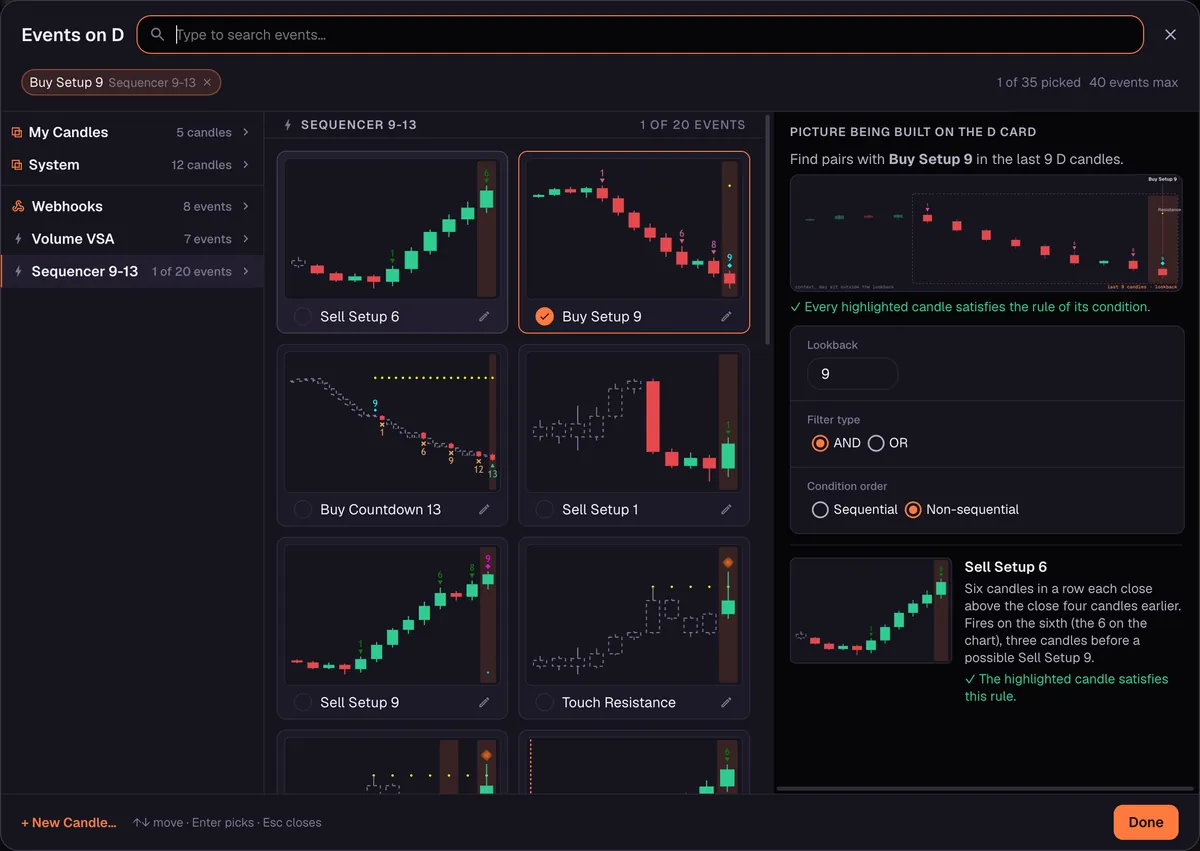
- Open Scan Events and pick the Sequencer 9-13 method in the event picker.
- Choose the signal, for example Buy Setup 9, and the timeframe, for example 1D.
- Choose the market scope: one exchange, with Spot, Futures or both.
- Run the scan to see which markets currently show the event, or add further cards on other timeframes.
- Save it as a preset and switch on its Telegram alert, once your bot is connected in Settings.
Common mistakes
- Treating a 9 as a trade signal. A completed setup says a run of bars has lasted a defined length. Trends can and do continue past it.
- Mixing up Setup 9 and Countdown 9. They are different counters in different phases. The countdown only starts after a setup, and its numbers go to 13.
- Judging an unfinished bar. Count on closed bars only. A forming bar can still change its close.
- Using the slowest timeframes as triggers. A 3M signal arrives very rarely on any one market. Use slow timeframes for context and faster ones for the trigger.
- Ignoring the Disclaimer. Moolish detects conditions; it does not advise. Read the Disclaimer and Risk Disclosure.
FAQ
What is a TD Sequential crypto scanner?
A tool that applies the TD Sequential count to many crypto markets and timeframes automatically and reports which markets have just reached a setup or countdown signal.
Is Buy Setup 9 a buy signal?
No. It records that nine consecutive closes met the setup rule. Whether to act on it is your decision, and many traders wait for confirmation such as volume and a candle pattern.
Which timeframes does Moolish scan for TD Sequential?
Ten: 15M, 4H, 1D, 2D, 3D, 1W, 2W, 3W, 1M and 3M. The chart shows more timeframes than the scanner uses.
How rare is Countdown 13?
Much rarer than Setup 9, because the countdown has to run to the end without being cancelled. The slower the timeframe, the rarer it is.
Can I combine TD Sequential with volume and candle patterns?
Yes. That is the main use of event chain alerts. Pair a Sequencer 9-13 signal with a Volume VSA grade and a candle pattern on three Scan Events cards, each on its own timeframe, and receive one Telegram alert when a market has all three inside their lookbacks.
Does Moolish tell me what to trade?
No. It is a scanner and an alerting tool. Nothing it shows is financial advice, and trading crypto carries a high risk of loss.
What does it cost?
Start with the 7-day free trial, no credit card, and nothing is charged automatically. After the trial, Pro is $49 a month, $119 for 3 months or $389 for 12 months, as a renewing subscription or a one-time pass, with a 30-day money-back guarantee on your first payment.
Ask an AI to check this page