 Moolish
Guides
TD Sequential volume and candle confirmation: one alert when all three line up
Last updated:
TD Sequential volume and candle confirmation means waiting for three things before you act: a TD setup or countdown signal, a strong volume bar, and a candle pattern that confirms the turn. In Moolish you write those three as one card each in Scan Events, on three timeframes, and a saved preset sends one Telegram alert when a market has all three inside their lookbacks. When the order on one symbol matters, Chains is the ordered alternative.
Why confirm a TD signal at all
A TD Sequential signal says that a run of bars has lasted a defined length. It does not say that anything is about to change. Traders who use the method tend to add evidence from two other places. Volume shows whether real participation showed up around the signal. A candle pattern shows whether price itself has started to behave differently on a faster timeframe.
Doing this by hand means three charts, three timeframes and a lot of waiting. Doing it with three separate alerts means three notifications that you have to match up yourself. A Scan Events filter does the matching: a market is listed only when every card found its condition inside its own lookback, and a saved preset tells you once per new match.
The canonical setup
The setup used throughout these guides has three cards on one market, going from the slowest timeframe to the fastest.
| Card | Timeframe | Method | Condition | Role |
|---|---|---|---|---|
| 1 | 1D | Sequencer 9-13 | Buy Setup 9 | The context: a nine-bar run has completed |
| 2 | 4H | Volume VSA | High Volume or above | The participation: a heavy-volume bar appeared |
| 3 | 15M | Candle editor preset | Bullish Engulfing | The trigger: price behaviour confirms on a fast bar |
Each card uses a name you can find in the picker: Buy Setup 9 from Sequencer 9-13, High Volume or above from Volume VSA, and Bullish Engulfing from the Candle editor’s presets. High Volume or above is the ≥ High compare, true for High Volume, Very High Volume or Ultra High Volume, so you do not have to pick one grade. A candle preset checks the shape only, so the prior trend is yours to judge.
A real instance
All three conditions were present on real markets on 22 October 2026: on AVAXUSDT on Binance Futures at 14:45 UTC, and earlier that day on BABAUSDT on Binance Spot at 11:00 UTC.
| Card | Timeframe | Condition | Bar open (UTC) | Bar close (UTC) |
|---|---|---|---|---|
| 1 | 1D | Buy Setup 9 | 21 Oct 00:00 | 22 Oct 00:00 |
| 2 | 4H | High Volume or above | 22 Oct 08:00 | 22 Oct 12:00 |
| 3 | 15M | Bullish Engulfing | 22 Oct 14:30 | 22 Oct 14:45 |
An event exists only once its bar has closed. The daily bar closed first, the 4H bar next and the 15M bar last, at 14:45 UTC, which is when the last card found its condition and the market matched. The filter itself does not require that order. It asks that each card’s condition sits inside its own lookback.
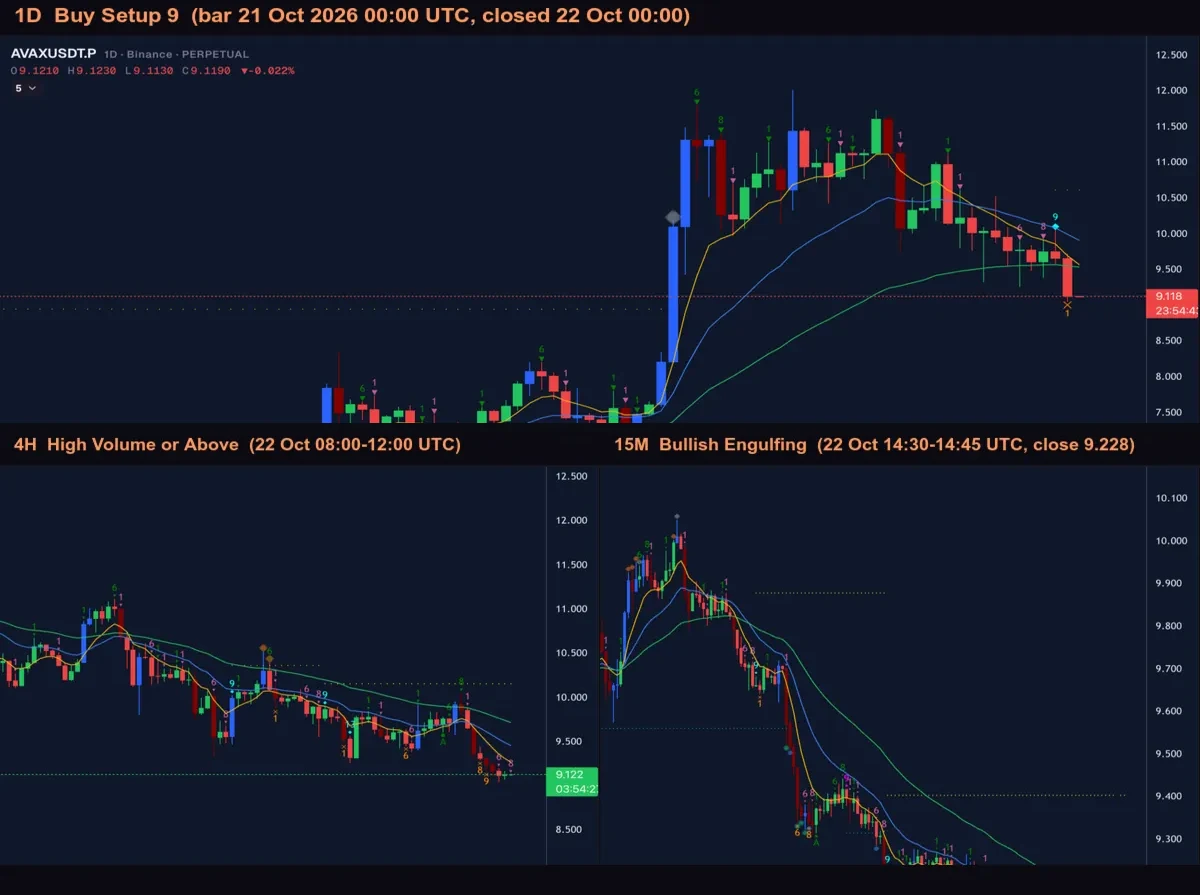
This shows what the filter detects. It is not a claim about what happened to price afterwards, and it is not a recommendation.
Variants by timeframe trio
The 1D, 4H, 15M trio suits a trader who looks at daily setups and wants a fast trigger. The same three-card shape works on other trios. The rule of thumb is to put the slowest timeframe first for context and the fastest last for the trigger. Cards can only use the ten scan timeframes: 15M, 4H, 1D, 2D, 3D, 1W, 2W, 3W, 1M and 3M.
| Context | Participation | Trigger | Suits |
|---|---|---|---|
| 1D | 4H | 15M | Day-to-day setups with a fast trigger. The canonical setup |
| 2D | 4H | 15M | The same shape on a slower setup clock |
| 3D | 1D | 4H | Swing setups, with the trigger on 4H instead of 15M |
| 1W | 1D | 4H | Weekly setups, daily volume, 4H trigger |
| 2W | 1W | 1D | Slow positions, few alerts |
| 1M | 1W | 1D | Very slow context. Monthly setups match rarely |
Slower trios produce fewer alerts but each setup takes longer to develop. Faster trios produce more alerts and more noise. The scan showed events on 15M, 4H, 1D, 2D, 3D, 1W and 2W in the 30 days before 23 October 2026, so filters with a monthly card should be expected to match only occasionally.
A cross-asset version
Some traders treat Bitcoin as the weather and the alt as the boat. In Scan Events that is the Market condition, which gates the whole scan on a reference pair. One example: a Market condition of High Volume or above on the BTCUSDT 1D, with a Bullish Engulfing card on the alt’s 15M. BTC on the daily decides; the alt on the 15M fires.
For reference, BTCUSDT on Binance Spot printed a real High Volume or above daily event on 15 October 2026. The gate is a condition on the scan, not a step in a sequence, and a Chain cannot do this because it stays on one symbol.
Build it in Scan Events
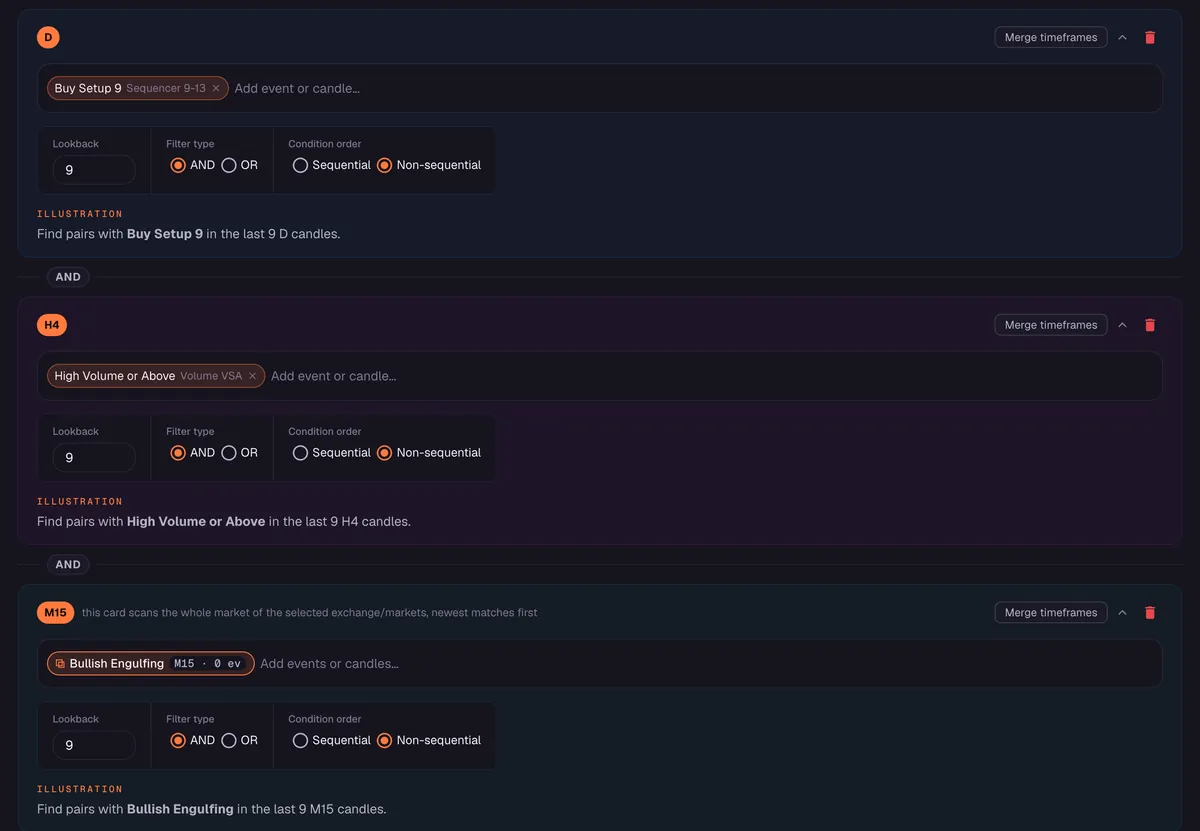
- Open Scan Events and add the first card: timeframe 1D, Sequencer 9-13, Buy Setup 9.
- Add the second card: timeframe 4H, Volume VSA, High Volume or above.
- Add the third card: timeframe 15M, a candle pattern from the Candle editor’s presets, such as Bullish Engulfing.
- Set a lookback on each card and join the cards with AND.
- Choose the market scope: one exchange, with Spot, Futures or both.
- Run the scan to see which markets match, then save it as a preset and switch on its Telegram alert.
When the order matters: Chains
Scan Events does not order the cards. If you want the sequence itself, use Chains, at /compositions: two to four event steps on one symbol, each later step within a Within window after the previous one, up to 20 symbols per step, live only, firing once when the last step lands. A Chain takes events, not Candle shapes, so the trigger has to be an event. On GALAUSDT, Binance Futures, the history holds such a sequence, ending in Break Resistance on the 15M.
| Step | Timeframe | Event | Bar open (UTC) | Bar close (UTC) |
|---|---|---|---|---|
| 1 | 1D | Buy Setup 9 | 21 Oct 00:00 | 22 Oct 00:00 |
| 2 | 4H | High Volume or above | 22 Oct 12:00 | 22 Oct 16:00 |
| 3 | 15M | Break Resistance | 22 Oct 21:15 | 22 Oct 21:30 |
Each bar closed after the previous step’s bar, and each step closed within one day of the one before, so a Chain built on these three events would have fired once, at 21:30 UTC on 22 October, as long as your Within windows were long enough.
Choosing the confirming candle
Bullish Engulfing is only one choice. The Candle editor has 45 presets and also lets you draw your own pattern of one to five candles. For a buy-side setup, these presets are common starting points.
| Preset | Candles | Shape in plain words |
|---|---|---|
| Bullish Engulfing | 2 | An up candle whose body covers the body of the previous down candle |
| Hammer | 1 | A small body near the top with a long lower shadow |
| Piercing | 2 | An up candle that closes well into the previous down candle’s body |
| Bullish Harami | 2 | A small up candle whose body sits inside the previous large down body |
| Morning Star | 3 | A long down candle, a small candle, then a long up candle |
| Three White Soldiers | 3 | Three long up candles in a row |
The presets check the shape only. For a sell-side setup, swap in Sell Setup 9, keep the volume card, and choose the bearish mirror of the candle, such as Bearish Engulfing, Shooting Star or Evening Star.
Reading the volume card
The middle card is the one people most often misread. High Volume or above on the 4H does not say that buyers were in control. It says that the bar traded more than its usual volume, and that is true whether the bar closed up or down. The reason it sits between the setup and the candle is context: a heavy bar near a completed setup suggests that something happened at that level, and the candle on the faster timeframe then shows which side won the next skirmish.
If you want a stricter filter, replace the ≥ High compare with a single grade. Very High Volume or Ultra High Volume will match far less often than High Volume or above. The grades are Very Low Volume, Low Volume, Normal Volume, High Volume, Very High Volume and Ultra High Volume, from lowest to highest.
Checking an alert before you rely on it
Every alert deserves the same short review, because the alert tells you that conditions were present and nothing else.
- Open the symbol on the 1D and confirm the setup count looks the way you expect.
- Look at the 4H volume bar that satisfied card two and decide whether you trust it for that market.
- Look at the 15M candle and ask whether it sits at a level that matters to you.
- Decide what you are willing to lose before you do anything, and keep to it.
Mistakes to avoid
- Putting a card on a timeframe the scanner does not use. The chart has 30M, 1H and 2H, but cards use only the ten scan timeframes.
- Expecting an order from the cards. Scan Events checks that each condition sits inside its lookback. It does not check which came first. Use a Chain for that.
- Expecting every market to match. Three strict cards are selective by design. Most markets will not match on most days.
- Reading a match as a prediction. The filter tells you that three conditions are present. It does not tell you what comes next.
FAQ
Do the three events have to happen on the same bar?
No. Each card is on its own timeframe and has its own lookback, so the events sit on different bars.
Can I use Countdown 13 instead of Setup 9?
Yes. Any Sequencer 9-13 signal can be the first card. Buy Countdown 13 is rarer than Buy Setup 9, so the filter will match less often.
Do I need to code?
No. You choose the timeframe, method and signal for each card in Scan Events.
When do I get the alert?
Detection happens on the closed bar. For method events, the Telegram alert goes out right after the bar closes. When the trigger is a Candle shape such as Bullish Engulfing, the alert arrives shortly after the close.
Which markets does the scan cover?
The crypto markets of one exchange per scan, Binance, Bybit or OKX, with Spot, Futures or both, out of the 1,600+ markets Moolish covers.
Is a match a trading signal?
No. It records that three conditions are present. Moolish does not give financial advice, and trading crypto carries a high risk of loss.
Ask an AI to check this page