 Moolish
Blog
Why TD Sequential counts differ between tools, and what a scanner has to get right
Last updated:
Open the same daily chart in two tools and you can get two different counts on the same candle. One shows a Sell Setup 9, the other a 6. Usually neither tool has a bug. They differ for one of four reasons, and the last one never shows on the chart. It matters most when a scanner, not you, is reading the chart for you. This post walks through all four causes, shows what we measured on real crypto bars, and lists what a TD Sequential scanner has to get right.
Moolish is not affiliated with, endorsed by or sponsored by Tom DeMark or DeMARK Analytics. TD Sequential is a method created by Tom DeMark, and DeMARK is a trademark of DeMARK Analytics. Sequencer 9-13 is Moolish's own name for its independent implementation of the published counting rules.
The short answer
TD Sequential counts differ between tools because of different bars, different rule variants, a candle that is still forming, or too little history. The first three are easy to check. The fourth is hard to see: a count carries memory from earlier bars, so a tool that read too little history starts in the wrong place, and every number after it can be off with nothing on screen to warn you. In our test on 23 crypto markets, counting only the 200 visible bars lost about one 13 in five.
Cause 1: the bars are different
A count is only as comparable as the bars under it. Two tools can cut daily or weekly bars at different times, or chart a different venue for the same coin, such as spot on one exchange and a perpetual on another. Moolish daily bars open at 00:00 UTC and weekly bars open on Monday at 00:00 UTC. If two counts disagree by exactly one bar, check the bar boundary and the venue first. The TD Sequential guide covers this in more detail.
Cause 2: different rule variants
Apart from DeMARK's own tools, each TD Sequential you meet is an independent implementation of the published rules, and those rules leave room for choices:
- The price flip. DeMark's description places a price flip before bar 1 of a setup. Some tools require it. Others start counting from the first qualifying close.
- The countdown test. Most tools compare the close with the low or high two bars earlier. Some variants compare on lows and highs instead of closes.
- Qualifying the 13. Some tools check the 13 against countdown bar 8 and mark a 13 that fails as non-qualified. Others print every 13.
- Perfection and restarts. Tools differ on whether they mark perfected setups and on when a new setup ends a running countdown.
Variant differences are consistent: one tool differs from another the same way every time, and its documentation usually says which rules it uses. The Sequencer 9-13 post lists the choices Moolish made.
Cause 3: the candle is still forming
Some tools count the current candle before it closes. If price is near the threshold, the count can show a 9 mid-session and drop back to an 8 at the close. This is one common meaning of repainting. A count on a closed bar stays put, so compare two tools on a closed bar and this cause goes away.
Cause 4: not enough history behind the count
This is the one you cannot see. Many indicators can be worked out from a short stretch of bars: a 20-period simple moving average needs the last 20 closes and nothing older. TD Sequential is different, because each number is the end of a chain of earlier decisions.
- The setup compares each close with the close four bars earlier and counts to 9. Bar 7 is only bar 7 because bars 1 to 6 passed before it.
- The countdown starts only after a setup completes, and its bars do not have to be consecutive. On a daily chart a countdown can run for months before it reaches 13, or be cancelled on the way.
- The levels a completed setup draws stay in force until price deals with them, and every touch of a level adds to its history. A support or resistance level on today's chart can come from a setup that finished long before the left edge of your screen.
If a tool starts reading in the middle of one of these chains, it cannot know the chain exists, so it starts again at zero. The 9 lands in the wrong place, a 13 goes missing, or a level is never drawn, so a touch or a break of it is never reported. None of this looks like an error. The chart looks normal, and the numbers are simply different from the ones you would get by counting from the start of the market.
On a chart you can at least scroll back and check. A charting platform normally runs its scripts over all the history loaded for the chart, including bars off screen. A scanner gives you no chart to scroll. It reports a number, and how much history stood behind that number is up to the scanner.
What we measured
To put numbers on cause 4, we ran our counting engine on the same bars with different amounts of history and compared the results with a full-history run, bar by bar. The test used daily and 4-hour Binance spot bars for 23 large markets, with 11 windows of 200 bars per market and timeframe (253 windows per timeframe). The latest window ended on 27 October 2026.
| Measure | Daily | 4-hour |
|---|---|---|
| 13s in the windows, counted with full history | 303 | 354 |
| 13s missing when counting only the 200 bars | 65 (21%) | 69 (19%) |
| 9s missing when counting only the 200 bars | 77 of 1,313 (6%) | 75 of 1,257 (6%) |
| Bars with a different countdown number | 18% | 26% |
| Windows with at least one missing or extra 13 | 25% | 27% |
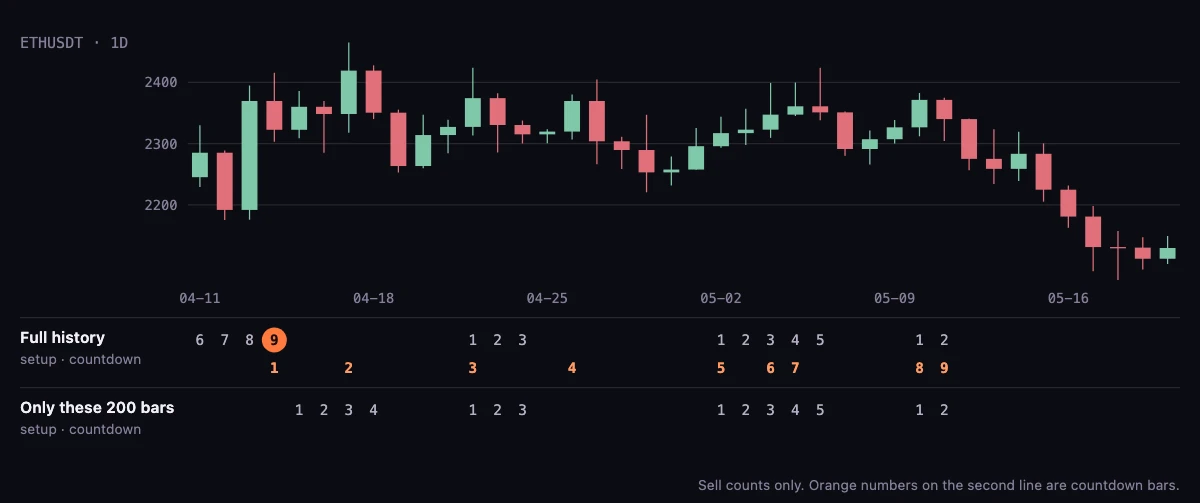
Then we added history in steps and watched what still differed.
| History before the window | Setup and countdown counts | Break signals on a level | Level touch counts |
|---|---|---|---|
| 300 bars | Match | Differ on up to 0.4% of bars | Differ on 20–43% of bars |
| 500 bars | Match | Differ on up to 0.3% of bars | Differ on 9–36% of bars |
| 1,500 bars | Match | Differ on up to 0.02% of bars | Differ on 2–3% of bars |
| 3,000 bars | Match | Match | Match |
Two things stand out. The 9 and 13 counts settle once a few hundred bars of history stand behind them. The levels take much longer: how many times a level has been touched, and whether today's break of it counts, depends on history that can be years old. Only at 3,000 bars did every output match in every window. That is the depth we chose for the chart. On the daily timeframe few markets have enough history for that last row, so it rests mostly on the 4-hour results.
This test measures our engine against itself. It shows what history depth does to a count, and it says nothing about how any other product is built.
What a TD Sequential scanner has to get right
A scanner earns its keep by reading hundreds of charts you will never open. That only works if each number it reports is one you would also get by counting the chart yourself. Five things decide that.
- Enough history behind every bar it reports on. From the measurements above: a few hundred bars for the counts, more for anything built on levels.
- Every market you trade, in one scan. A 13 on a market the scanner does not cover is a 13 you never hear about.
- The timeframes TD traders use. Many traders read the counts on 2-day, 3-day and 2-week bars as well as the usual daily and weekly ones.
- Confirmation in the same scan. A 9 alone is a starting point. Many traders then look for volume or a candle pattern, often on a lower timeframe.
- An alert on bar close, from the same engine as the chart. When the alert and the chart agree, you can trust the alert without re-counting the chart.
Here is how Moolish and one widely used alternative, TradingView's Pine Screener, stack up on those five points. The Pine Screener column uses only what TradingView's own requirements page states, checked on 28 October 2026. TradingView is the stronger product for charting, and the scanner comparison covers more tools.
| What to check | Moolish | TradingView Pine Screener |
|---|---|---|
| History behind each bar | At least 1,500 bars in the scanner and at least 3,000 on the chart, or the full history of a younger market | "The indicator calculates data based on only the last 500 bars on the chart." |
| Markets in one scan | More than 1,000 Binance spot and futures markets with Sequencer 9-13 events, scanned together | One source at a time: a watchlist, or an index of up to 4,000 symbols |
| Timeframes | 15M, 4H, 1D, 2D, 3D, 1W, 2W, 3W, 1M and 3M | 1, 5, 15 and 30 minutes, 1, 2 and 4 hours, 1 day, 1 week and 1 month. Custom timeframes are not supported |
| Confirmation in the same scan | Scan Events combines TD events, volume grades and candle shapes on different timeframes in one scan | One indicator per screen |
| Alerts | Telegram alerts on bar close, from the same engine as the chart | The requirements page does not say whether alerts can be created from the screener |
The first row is the one this post is about. Our engine with 500 bars of history got every 9 and 13 right, but a 500-bar limit is short for anything that depends on the levels, as the second table shows. That says nothing about any particular Pine script, which may count its levels differently. It does say why we read three to six times that depth.
How Moolish handles history depth
We built Sequencer 9-13 because we kept getting counts we could not trust in exactly those places. Here is what the engine reads before it gives you a number.
- On the chart, the count is worked out over at least 3,000 bars of history before the first candle you see. If the market is younger than that, counting starts at its first bar. The chart opens with a few hundred candles like any other, but the leftmost one has that history behind it.
- In the scanner and in alerts, the engine reads at least 1,500 bars of history before the first bar it reports on, or from the first bar of a younger market. A new subscription does not start counting from the day you subscribe.
- One counting engine for all three. The chart, Scan Events and Telegram alerts use the same rules on the same bars. At these depths, an alert's 9 or 13 is the 9 or 13 you see on the chart. Level touch counts in the scanner can still differ from the chart by a few percent, because the chart reads about twice the history.
- Closed bars in scans and alerts. Scan Events and Telegram alerts count closed bars only, so a 9 never arrives mid-candle and then disappears.
Four checks for any TD Sequential tool
You do not have to take our word for any of this. These checks take a few minutes and work on any platform, ours included.
- Line up the bars. Make sure both tools show the same venue and the same bar boundary before you compare a single count.
- Compare on a closed bar. Pick a candle that closed at least a day ago on the daily chart. That removes the forming-bar cause.
- Ask how much history the scanner reads. If its documentation gives a bar limit, compare it with the tables above. If it says nothing, ask.
- Match a scanner hit to the chart. When a scanner reports a 9 or a 13, open the chart, load plenty of history and check that the same number sits on the same candle.
FAQ
Why does my TD Sequential count differ from TradingView?
Check four things in order: the venue and bar boundary, the rule variant the script uses, whether you are comparing a closed bar, and how much history each side read. Most one-bar differences come from the bar boundary. Differences on long countdowns usually come from history depth.
How much history does TD Sequential need?
In our test on 23 crypto markets, a few hundred bars of history were enough for the 9 and 13 counts to match a full-history count, while counting only the 200 visible bars lost about one 13 in five. Signals built on the support and resistance levels needed far more: only at 3,000 bars did every output match.
Does TD Sequential repaint?
A count on a closed bar stays put. A count shown on a candle that is still forming can appear and disappear before the close. Moolish scans and alerts count closed bars only.
What is the best TD Sequential scanner for crypto?
The one whose counts match the chart on the markets and timeframes you trade. Check how much history it reads, which markets and timeframes it covers, whether it can add volume or candle confirmation, and whether its alerts come from the same engine as its chart. Moolish publishes its answers to all four on this page.
What we do not claim
Deep history makes a count consistent. A forecast is a different thing. A 9 or a 13 marks a trend that has run for a measured number of bars, and many are followed by more of the same trend. Sequencer 9-13 follows the published rules with the choices listed in the Sequencer 9-13 post, and it does not claim to match any other vendor's output bar for bar. Use the counts as one input, check them on the chart, and size your risk for the times they are wrong. Trading crypto carries a high risk of loss, and nothing on Moolish is financial advice.
To see the counts on your own markets, the TD Sequential crypto scanner guide shows how to set up a scan and an alert. Moolish has a 7-day free trial with no credit card.
Sources
Read from each public page on the date shown. Check the page itself before you decide, because products and prices change.
- https://www.tradingview.com/pine-script-docs/language/execution-model/, checked October 28, 2026. A Pine script runs once on every historical bar of the chart's dataset, whose values are final, and recalculates the open realtime bar on each tick until it closes.
- https://www.tradingview.com/support/solutions/43000742436-tradingview-pine-screener-key-features-and-requirements/, checked October 28, 2026. The indicator calculates data based on only the last 500 bars on the chart; one source at a time; indices up to 4,000 symbols; one indicator per screen; custom timeframes not supported; supported timeframes 1, 5, 15, 30 minutes, 1, 2, 4 hours, 1 day, 1 week, 1 month. The page does not say whether alerts can be created from the screener.
Ask an AI to check this page