 Moolish
Guides
Multi-timeframe crypto scanner: from single conditions to event chains
Last updated:
A multi-timeframe crypto scanner checks the same market on more than one timeframe at once, so a slow chart can set the context and a fast chart can pull the trigger. Moolish does this in Scan Events with one card per timeframe, each with its own lookback, and it adds a Market condition that gates the whole scan on another asset such as BTCUSDT. For an ordered sequence on one symbol it has a separate tool, Chains.
What multi-timeframe scanning means
Traders look at more than one timeframe for a simple reason. A daily chart tells you where a market has been and what it has been doing for weeks. A 15-minute chart tells you what it is doing now. A setup on the daily is easy to see but slow to resolve, and a pattern on the 15M is quick but ambiguous on its own. Reading both is how many traders add context to a fast signal.
Doing this by hand scales badly. For one market it is a few clicks. For a universe of 1,600+ crypto markets it is not possible, and the bars that matter close while you are away. A multi-timeframe scanner moves that reading into software: you describe what you want to see on each timeframe, and it watches every closed bar.
There are three levels of doing this, and the difference between them is the main point of this guide. They are a single condition, several cards checked together in Scan Events, and an ordered Chain.
Single, multi-card and Chain compared
| Aspect | Single condition | Scan Events cards | Chains |
|---|---|---|---|
| What you write | One signal on one timeframe | One card per timeframe, each with events or Candle shapes and a lookback | 2–4 event steps on one symbol |
| Order of events | Not applicable | Not enforced across timeframes. Cards are joined with AND or OR | Enforced. Each later step must land within its Within window after the previous one |
| Timeframes | One | One card per timeframe, from the ten scan clocks | One per step |
| Symbols | One market scope | The whole market of one exchange. A Market condition can gate it on another pair | One symbol per chain, up to 20 symbols per step |
| Alerts you receive | One per hit | One Telegram message when a saved preset finds new matches after a bar closes | One when the last step lands |
| Best for | A shortlist of markets that printed a signal | A state check: context, participation and trigger all present | A sequence on one symbol: this, then that, within the time you allow |
| Weak spot | Noisy on fast timeframes | Cannot say which condition came first | Live only, events only, no Candle shapes and no history scan |
A single condition answers “which markets printed this now?”. Several cards answer “which markets have all of these inside their windows?”. A Chain answers “on this symbol, did this happen, then this, then this?”. A TD Sequential trader who waits for a setup, then volume, then a candle can use either: the cards for a whole-market scan with history, the Chain for a strict sequence on a short list of symbols.
The 16 chart timeframes and the ten scan clocks
Moolish has 16 timeframes on its chart. Ten of them are scan timeframes, which means they can be used for events, Scan Events cards and Chains: 15M, 4H, 1D, 2D, 3D, 1W, 2W, 3W, 1M and 3M. The other six exist on the chart only.
| Group | Chart code | Scan card or Chain step | Note |
|---|---|---|---|
| Minutes | 1m | No | Chart only. One minute, lowercase m |
| Minutes | 5m | No | Chart only |
| Minutes | 15m | Yes | Shown as 15M in Scan Events. The fastest scan timeframe |
| Minutes | 30m | No | Chart only. Binance spot and futures |
| Minutes | 45m | No | Chart only. Binance spot and futures |
| Hours | 1h | No | Chart only. Binance spot and futures |
| Hours | 2h | No | Chart only. Binance spot and futures |
| Hours | 4h | Yes | Shown as 4H. The usual middle card |
| Days | 1D | Yes | The most watched setup clock |
| Days | 2D | Yes | |
| Days | 3D | Yes | |
| Weeks | 1W | Yes | |
| Weeks | 2W | Yes | |
| Weeks | 3W | Yes | |
| Months | 1M | Yes | One month, capital M |
| Months | 3M | Yes | Very slow. Few events |
Mind the case: on the chart, lowercase 1m is one minute and uppercase 1M is one month. In the scanner, 1M always means one month, because nothing below 15M is a scan timeframe.
The rule that matters for cards is short: Scan Events cards use only the ten scan timeframes, which are 15M, 4H, 1D, 2D, 3D, 1W, 2W, 3W, 1M and 3M. If you want a one-hour condition, you cannot have one on a card. Use the 15M or the 4H instead. Chains has its own timeframe options, so check them in the app before you plan one around a timeframe that is not on this list.
Which timeframes produce events
Not every scan timeframe produces events at the same rate. In the 30 days before 23 October 2026, events were recorded on 15M, 4H, 1D, 2D, 3D, 1W and 2W. The slowest clocks, 3W, 1M and 3M, are available, but a bar on them closes once every few weeks or once a quarter, so a scan with a card on one of them matches only occasionally. That is expected, not a fault. Use the slowest timeframes for context and the fastest for the trigger.
Bar close and lookback
An event in Moolish is stamped with the open time of its bar but exists only from the bar’s close. A 1D event dated 21 October 00:00 UTC is created when that daily bar closes, at 22 October 00:00 UTC. A Scan Events card then looks back over the last N candles of its timeframe, 9 by default, and asks whether the event is among them.
The consequence is that each card has its own window and the windows are not ordered against each other. A market matches when every card, joined with AND, found its event inside its own lookback. The example below shows the three cards of the canonical setup on one market.
| Card | Timeframe | Condition | Method | Bar open (UTC) | Bar close (UTC) |
|---|---|---|---|---|---|
| 1 | 1D | Buy Setup 9 | Sequencer 9-13 | 21 Oct 00:00 | 22 Oct 00:00 |
| 2 | 4H | High Volume or above | Volume VSA | 22 Oct 08:00 | 22 Oct 12:00 |
| 3 | 15M | Bullish Engulfing | Candle editor preset | 22 Oct 14:30 | 22 Oct 14:45 |
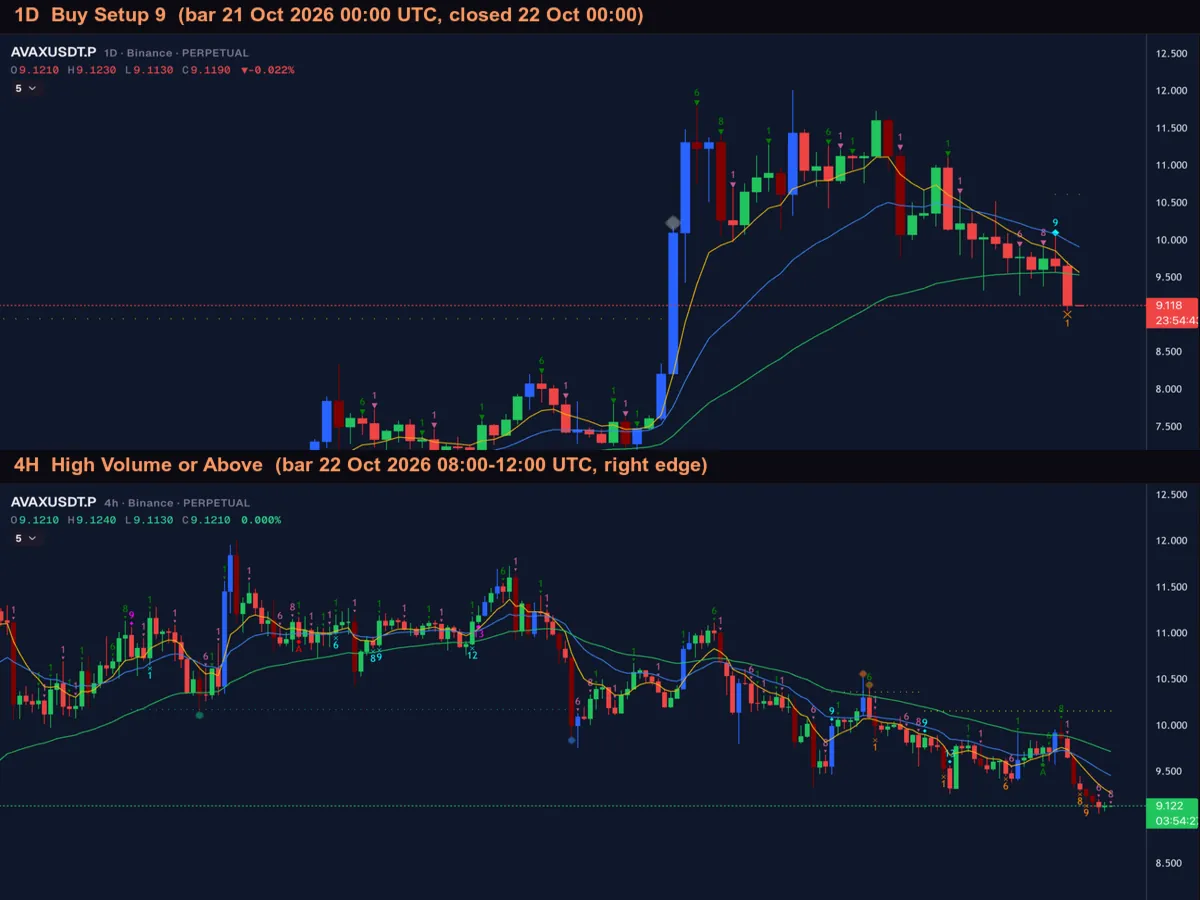
This shows what a filter detects. It does not claim anything about what price did afterwards. If the sequence is what you need, with each event inside a Within window after the one before, build it as a Chain: the same symbol, two to four event steps, live only.
Slow to fast, and why
Most setups pair a slow card with a fast one, and there is a reason. The slow condition is rare and sets the context, so it filters the universe down to a few markets. The fast condition is frequent, so it would flood you if it stood alone, but after the slow card has narrowed the field it becomes a precise trigger. A filter built the other way round will usually show many more markets and give less context for each.
| Style | Context | Participation | Trigger | What to expect |
|---|---|---|---|---|
| Active, day to day | 1D | 4H | 15M | The canonical setup. More matches, quick resolution |
| Swing | 3D | 1D | 4H | Fewer matches, each one takes days to develop |
| Position | 1W | 1D | 4H | Few matches, long lead times |
| Slow context | 1M | 1W | 1D | Rare. Treat each match as an event |
Across assets, not only timeframes
A Scan Events filter can also depend on another asset. Many altcoins follow Bitcoin, so a trader may want the BTC daily to set the context and an altcoin’s 15M to fire. In Moolish that is the Market condition, an optional part of the filter that gates the whole scan on a reference pair, a timeframe and events. For example, High Volume or above on the BTCUSDT 1D can be the gate, with a Buy Setup 9 or a candle pattern on an altcoin’s card as the trigger. The idea fits in one sentence: BTC on the daily decides, the alt on the 15M fires.
For reference, BTCUSDT on Binance Spot printed a real High Volume or above event on its daily bar dated 15 October 2026. It shows that the gate condition exists on real data. It is not a statement that the gate led to anything. A Chain cannot do this, because a Chain stays on one symbol.
Single, multi-card and Chain: which to choose
The three levels are not a ladder where the highest is always best. Each answers a different question, and the right one is the simplest that still captures what you would check by hand.
- Use a single condition when you want a daily shortlist. “Which markets closed a Buy Setup 9 on the 1D?” is a good question for one condition, and the answer is a list to review.
- Use several cards when the question is about state across timeframes, such as a market with a Buy Setup 9 on the 1D, a heavy bar on the 4H and a candle shape on the 15M inside their lookbacks, with or without a Bitcoin gate.
- Use a Chain when the order on one symbol is the point. A setup, then volume, then a trigger event is a story with a beginning and an end, and Chains is the tool that keeps the order.
The methods you can combine
Moolish has two built-in methods, both free to subscribe to and both running on all ten scan timeframes, plus the Candle editor. A Scan Events filter can mix all three. A Chain can use the two methods’ events, but not Candle shapes.
| Method | What it records | Example condition |
|---|---|---|
| Sequencer 9-13 | TD Sequential setups and countdowns, plus support and resistance events: signals in three families | Buy Setup 9 on the 1D |
| Volume VSA | A volume grade for each closed bar: six grades in three families | High Volume or above on the 4H |
| Candle editor | 45 presets, plus your own pattern of one to five candles. The preset checks the shape only | Bullish Engulfing on the 15M |
Markets covered
Moolish covers 1,600+ crypto markets: Binance spot and futures, Bybit and OKX, plus TradingView-sourced indices. A Scan Events scan runs on one exchange at a time, Binance, Bybit or OKX, with Spot, Futures or both. The TradingView-sourced indices are not selectable as a scan scope.
Build a multi-timeframe filter
- Open Scan Events and add the first card: pick the slowest timeframe, a method and a signal, for example 1D, Sequencer 9-13, Buy Setup 9.
- Add a second card on a faster timeframe, for example 4H, Volume VSA, High Volume or above.
- Add a third card on the fastest timeframe, for example 15M with a Bullish Engulfing preset from the Candle editor.
- Set the lookback of each card and join the cards with AND.
- If you want a cross-asset gate, add a Market condition: 1D, reference pair BTCUSDT, High Volume or above.
- Choose the exchange and run the scan to see which markets match.
- Save it as a preset and switch its Telegram alert on. See Telegram alerts for setup and limits.
How fast the alert arrives
A preset is evaluated when a bar closes. For method events such as Buy Setup 9 or High Volume or above, the alert goes to Telegram right after the bar closes. When the trigger is only a Candle shape, such as the Bullish Engulfing card above, the alert arrives shortly after the bar closes. Moolish does not claim instant alerts. For decisions that depend on a few seconds, check how the message path behaves for you before you rely on it.
Reading a multi-timeframe alert
When an alert arrives, it tells you the symbol and that every card found its condition. What you do next is a short review, and it is worth doing the same way each time so that you notice when something is off.
- Open the slowest timeframe first and look at the context condition. Does the setup or countdown look the way you expect on the chart?
- Move to the middle timeframe and find the bar that satisfied the participation condition. Is that bar one you would trust for this market, given how thinly or heavily it normally trades?
- Open the fastest timeframe and look at the trigger. Does the pattern sit at a level that matters to you, or in the middle of nothing?
- Decide what you would be willing to lose before you do anything, and keep to it.
The review takes a minute because the scanner has already done the hard part: it has found the one market in hundreds where all three conditions are present. What it cannot do is decide whether the picture makes sense to you.
Limits to keep in mind
- Closed bars only. A condition that is true on a forming bar is not an event until the bar closes.
- Scan timeframes only for cards. Chart-only timeframes such as 1H, 2H and 30M cannot be cards.
- No order across cards. Scan Events does not know which card’s event came first. Use a Chain for that, on one symbol.
- One exchange per scan. And alerts are off while the market scope is narrowed by sector, market cap or volume.
- A filter cannot see what is not a rule. News, thin liquidity and a cramped chart are invisible to it. Review each alert before you act.
Common mistakes
- Treating a match as a prediction. It records that conditions are present. It says nothing about the next bar.
- Using a monthly card as a trigger. Monthly bars close rarely, so the filter will almost never match.
- Putting the fast condition alone. It will match often, with little context behind each alert.
- Using too many cards. Each extra card makes a match rarer. Two or three cards are usually enough.
- Ignoring the Disclaimer. Moolish detects conditions and gives no financial advice. Read the Disclaimer and Risk Disclosure.
FAQ
What is a multi-timeframe crypto scanner?
A scanner that looks at more than one timeframe when it decides whether a market matches. In Moolish this can be a single condition, several Scan Events cards joined by AND, or an ordered Chain on one symbol.
How many timeframes does Moolish support?
16 on the chart. Ten of them are scan timeframes: 15M, 4H, 1D, 2D, 3D, 1W, 2W, 3W, 1M and 3M.
Can I use the 1H timeframe on a card?
No. 1H is on the chart only. Use the 15M or the 4H for a fast card.
What is the difference between cards and a Chain?
Cards must all find their condition inside their own lookback, with no order between them. A Chain also requires an order: each step has to land within its Within window after the one before it, on the same symbol.
Can a scan depend on a different symbol?
Yes, with the Market condition. For example BTCUSDT on the 1D with High Volume or above can gate an altcoin’s 15M trigger.
How many alerts do I get?
A saved preset sends one Telegram message when it finds new matches after a bar closes. A Chain sends one when its last step lands.
Do I need to code?
No. You pick the timeframe, method and signal for each card in Scan Events.
What does it cost?
Start with the 7-day free trial, no credit card, and nothing is charged automatically. After the trial, Pro is $49 a month, $119 for 3 months or $389 for 12 months, as a renewing subscription or a one-time pass, with a 30-day money-back guarantee on your first payment.
Ask an AI to check this page