 Moolish
Guides
Volume VSA crypto scanner: grade every closed bar and scan for heavy volume
Last updated:
A volume VSA crypto scanner reads the volume of every closed bar, gives it a grade from Very Low Volume to Ultra High Volume, and tells you when a market prints the grade you care about. Moolish does this with the Volume VSA method on all ten scan timeframes, and lets you use the result as one condition on a Scan Events card or as an event in a Chain.
What volume spread analysis is
Volume spread analysis, usually shortened to VSA, is a way of reading a price bar together with the volume behind it. Tom Williams developed the method, building on the work of Richard Wyckoff. The idea is old and simple. A price move made on heavy volume involved many participants. The same move on thin volume involved few, and traders often treat the two differently. VSA practitioners look at the volume, the range of the bar and where it closed within that range, and ask what the combination says about who was active.
Moolish’s Volume VSA method takes the first part of that idea and automates it. It grades each closed bar’s volume against average volume and records an event for the grade. It does not decide whether a heavy bar was buying or selling, and it does not judge the spread. That reading is left to you, or to the other conditions in the same filter.
| VSA reading | What it looks at | What Moolish gives you |
|---|---|---|
| No demand | Volume, spread and close together | The volume grade only. Spread and close stay with the reader |
| Stopping volume | Volume, spread and close together | The volume grade only |
| Climax | Volume, spread and close together | The volume grade only |
| Test | Volume, spread and close together | The volume grade only |
The Volume VSA grades
The Volume VSA method page lists its grades in three families: Above average, Average and Below average. Each of the six grades is one band. High Volume or above is not a seventh grade. It is a compare on the High band, written ≥ High, that is true for the three upper grades. The names below are exactly as they appear in the app.
| Order | Signal | What it means |
|---|---|---|
| 1 | Very Low Volume | The bar traded far less than its usual volume |
| 2 | Low Volume | The bar traded less than its usual volume |
| 3 | Normal Volume | The bar traded about its usual volume |
| 4 | High Volume | The bar traded more than its usual volume |
| 5 | Very High Volume | The bar traded far more than its usual volume |
| 6 | Ultra High Volume | The bar traded at the top grade, well beyond its usual volume |
| ≥ High | High Volume or above | Compare: true when the grade is High Volume, Very High Volume or Ultra High Volume |
Each grade is defined relative to average volume for that market and timeframe, not as a fixed number of coins or dollars. That is why the same grade can mean very different absolute volume on Bitcoin and on a small altcoin. The exact cut-offs between grades are set by the method. Open a signal in the event picker to read its rule before you rely on it.
High Volume or above, the ≥ High compare
Most setups do not care which of the three upper grades a bar reached. They care that the bar was heavy. High Volume or above exists for that: one condition that accepts High Volume, Very High Volume and Ultra High Volume. It is the volume condition in the standard setup, where it sits between a Buy Setup 9 on the 1D and a confirming candle on the 15M.
| Bar’s grade | High Volume or above | Ultra High Volume | Normal Volume |
|---|---|---|---|
| Normal Volume | No | No | Yes |
| High Volume | Yes | No | No |
| Very High Volume | Yes | No | No |
| Ultra High Volume | Yes | Yes | No |
Use the ≥ High compare when you want more alerts and are happy to review each one. Use a single upper grade when you want fewer, stricter alerts. Ultra High Volume as a card will match far less often than High Volume or above.
Where the grade is computed
The grade belongs to a closed bar. A 4H bar that is still forming can show a lot of volume so far and still end the period as Normal Volume, so Moolish records the grade only when the bar closes. This is the same rule that applies to every other signal. The event is stamped with the bar’s open time, and it exists from the bar’s close, which is the moment a filter can use it.
That has one practical consequence. A volume grade on the 1D is not available until the daily bar closes, and a grade on the 4H is not available until the fourth hour ends. If you build a filter with a volume card on the 4H, the card is satisfied at a 4H close.
Scan timeframes and markets
Volume VSA runs on all ten scan timeframes, from 15M to 3M, across the 1,600+ crypto markets Moolish covers. A scan runs on one exchange at a time, Binance, Bybit or OKX, with Spot, Futures or both. The method is free to subscribe to.
| Timeframe | How the grade is often used |
|---|---|
| 15M | Spotting a burst of activity close to a trigger |
| 4H | The usual participation step between a daily setup and a fast trigger |
| 1D | Finding markets where a whole day was heavy |
| 2D, 3D | Multi-day swings in activity |
| 1W, 2W | Slow context. Heavy weekly bars are less frequent |
| 3W, 1M, 3M | Very slow signals that match rarely on any single market |
The chart shows 16 timeframes, including 30M, 1H and 2H. Those three are chart-only: the scanner and Chains use the scan timeframes above.
A real example
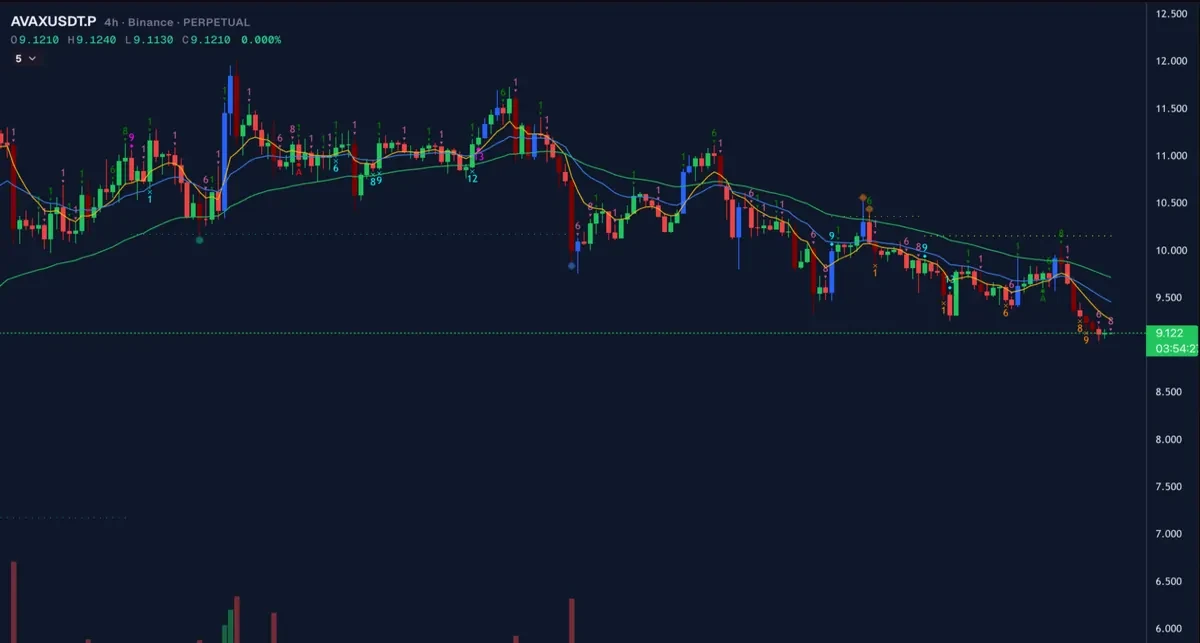
On 22 October 2026 the 4H bar that opened at 08:00 UTC and closed at 12:00 UTC on AVAXUSDT, Binance Futures, carried High Volume or above. It was the middle card of a three-card Scan Events filter: a Buy Setup 9 on the 1D had closed at 00:00 UTC that day, and a Bullish Engulfing on the 15M closed at 14:45 UTC, at which point every card had its condition inside its lookback. The event chain guide walks through the whole instance.
| Card | Timeframe | Condition | Bar open (UTC) | Bar close (UTC) |
|---|---|---|---|---|
| 1 | 1D | Buy Setup 9 | 21 Oct 00:00 | 22 Oct 00:00 |
| 2 | 4H | High Volume or above | 22 Oct 08:00 | 22 Oct 12:00 |
| 3 | 15M | Bullish Engulfing | 22 Oct 14:30 | 22 Oct 14:45 |
This shows what the scanner detects. It says nothing about what price did afterwards.
How to read a volume grade
A volume grade is evidence about participation. It is not a direction. A bar can be Ultra High Volume and close down, close up or close flat. What the grade adds is context for a nearby signal.
- With a TD setup or countdown. A completed Buy Setup 9 followed by heavy volume tells you the market did not simply drift through the level. Something drew participants in. Whether it was buying or selling is for the candle step, or for you, to settle.
- With a candle pattern. A Bullish Engulfing on thin volume and the same pattern on heavy volume are different observations, and traders who care about the difference can require the grade on another card.
- Alone. A scan for Ultra High Volume on the 1D gives you a shortlist of markets that traded unusually hard that day. It is a way to find charts worth opening, not a reason to trade.
Low-volume grades are useful too
Most people scan for heavy bars, but the lower grades have uses. Very Low Volume and Low Volume mark quiet bars. Some traders look for a quiet pullback after a heavy move, or a quiet bar at a level that has just been tested. Because the grades are separate events, you can ask for a heavy bar on a slow timeframe and a quiet bar on a faster one, and be told when both are present inside their lookbacks.
Set up a volume scan in Moolish
- Open Scan Events and pick the Volume VSA method in the event picker.
- Choose the grade, for example High Volume or above, and the timeframe, for example 4H.
- Choose the market scope: one exchange, Binance, Bybit or OKX, with Spot, Futures or both.
- Run the scan to see which markets just closed a bar at that grade.
- To make it a confirmation, add a TD Sequential card on a slower timeframe and a candle card on a faster one, join them with AND, then save the filter as a preset and switch on its Telegram alert. See Telegram alerts.
Common mistakes
- Reading volume as direction. A heavy bar is neither bullish nor bearish by itself.
- Comparing grades across markets as absolute volume. The grade is relative to that market’s own average.
- Using a monthly timeframe for a daily trader’s trigger. Monthly grades are slow and rare. Use them for context.
- Expecting a forming bar to count. The grade appears only when the bar closes.
- Treating a scan hit as advice. Moolish detects conditions. Read the Disclaimer and Risk Disclosure.
FAQ
What is a volume VSA crypto scanner?
A tool that grades each closed bar’s volume against average volume across many crypto markets and timeframes, and reports which markets just reached a grade you chose.
What are the Volume VSA grades in Moolish?
Very Low Volume, Low Volume, Normal Volume, High Volume, Very High Volume and Ultra High Volume, plus High Volume or above, which is the ≥ High compare.
Is High Volume or above the same as High Volume?
No. High Volume is one grade. High Volume or above is true for High Volume, Very High Volume and Ultra High Volume.
Does a heavy volume bar mean price will rise?
No. It means participation was strong. Direction is not part of the grade, and Moolish does not predict price.
Can I combine volume with TD Sequential?
Yes. Put a Sequencer 9-13 signal, a Volume VSA grade and a candle pattern on three cards, each on its own timeframe and joined with AND, and a saved preset sends one Telegram message when all three are present inside their lookbacks. The confirmation guide shows the steps.
Is Volume VSA free?
The method is free to subscribe to. Start with the 7-day free trial, no credit card, and nothing is charged automatically. After the trial, Pro is $49 a month, $119 for 3 months or $389 for 12 months, as a renewing subscription or a one-time pass, with a 30-day money-back guarantee on your first payment.
Ask an AI to check this page