 Moolish
Guides
Event chain alerts: one alert when several conditions line up
Last updated:
An event chain alert is one alert for a setup that needs several conditions, not a stream of single-indicator notifications. Moolish has two tools for it. Scan Events takes one card per timeframe, each with a lookback, joined by AND, and can gate the whole scan on another market. Chains is the ordered tool: steps on one symbol that must follow each other inside Within windows.
What an event chain is
An event in Moolish is a named condition that happened on a closed bar: Buy Setup 9, High Volume or above. An event chain is the idea of combining several such conditions across timeframes, and sometimes across assets, so that you hear about one setup instead of three separate signals.
The two tools answer different questions, and mixing them up is the most common mistake. Scan Events asks “which markets have all of these conditions inside their lookback windows?”. Chains asks “on this symbol, did this happen, and then that, and then the next within the time I allowed?”. The first checks co-occurrence. Only the second checks order.
| Aspect | Scan Events | Chains |
|---|---|---|
| Where | Scan Events | Chains, at /compositions |
| Structure | One card per timeframe, each with events or Candle shapes and a lookback (default 9 candles) | 2–4 event steps, each later step within a Within window after the previous one |
| Order across timeframes | Not enforced. Cards are joined with AND or OR | Enforced. Each step follows the one before it |
| Symbols | The whole market of one exchange. A Market condition can gate it on a reference pair | The same symbol throughout, up to 20 symbols per step |
| Candle editor shapes | Yes, as card conditions | No, steps are events only |
| History | Yes. Newest matches first, over history | Live only, no history scan |
| Alert | A saved preset sends one Telegram message when it finds new matches after a bar closes | Fires once when the last step lands, and sends the Telegram message |
The canonical setup in Scan Events
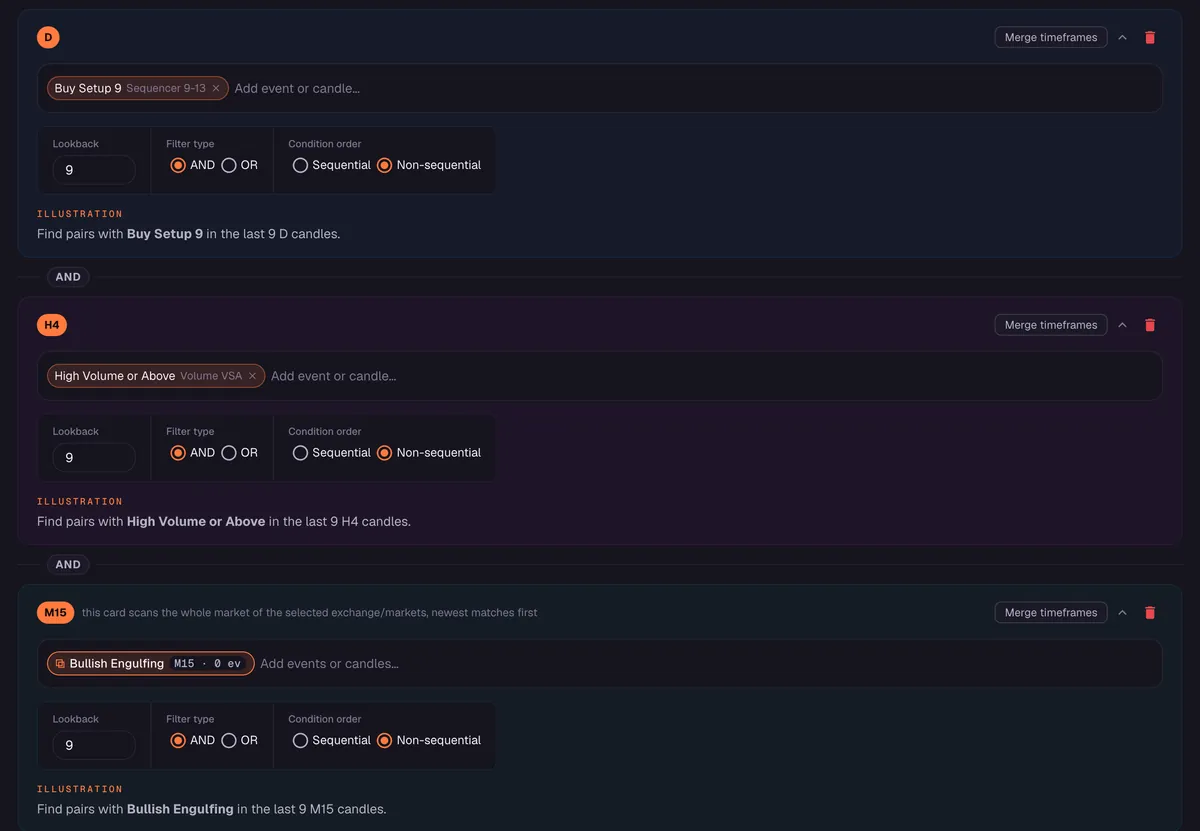
The setup used throughout these guides has three conditions. It is written for traders who read TD Sequential and want volume and a candle to agree before they act. In Scan Events it is three cards.
| Card | Timeframe | Method | Condition | What it adds |
|---|---|---|---|---|
| 1 | 1D | Sequencer 9-13 | Buy Setup 9 | Context: a nine-bar run has completed |
| 2 | 4H | Volume VSA | High Volume or above | Participation: a heavy-volume bar appeared |
| 3 | 15M | Candle editor preset | Bullish Engulfing | Trigger: a confirming candle shape on a fast bar |
With the cards joined by AND, a market matches when every card found its condition inside its own lookback: Buy Setup 9 within the last 9 daily candles, High Volume or above within the last 9 4H candles, and Bullish Engulfing within the last 9 15M candles. The cards are not ordered. The filter does not care which of the three happened first.
A walkthrough on real data
AVAXUSDT on Binance Futures shows all three conditions on 22 October 2026. The table lists each with its bar open and close. An event is stamped with its bar’s open time but exists only once the bar has closed, so both times are shown.
| Card | Timeframe | Condition | Bar open (UTC) | Bar close (UTC) |
|---|---|---|---|---|
| 1 | 1D | Buy Setup 9 | 21 Oct 00:00 | 22 Oct 00:00 |
| 2 | 4H | High Volume or above | 22 Oct 08:00 | 22 Oct 12:00 |
| 3 | 15M | Bullish Engulfing | 22 Oct 14:30 | 22 Oct 14:45 |
- 22 Oct 00:00 UTC. The daily bar that opened on 21 October closes with Buy Setup 9. It sits inside the last 9 daily candles for the rest of that window.
- 22 Oct 12:00 UTC. A 4H bar that opened at 08:00 closes with High Volume or above, inside the last 9 4H candles.
- 22 Oct 14:45 UTC. A 15M bar that opened at 14:30 closes as a Bullish Engulfing, with a close of 9.228. At this close every card has its condition inside its lookback, so AVAXUSDT matches.
In this instance the bars also closed in the order of the cards, but the filter would have matched in any order. A second market, BABAUSDT on Binance Spot, matched earlier that day at 11:00 UTC. These are examples of what a filter detects. They say nothing about what price did afterwards and they are not recommendations.
Rules Scan Events follows
| Rule | What it means |
|---|---|
| Closed bars only | A condition counts when its bar closes. A condition that looks true on a forming bar does not count yet |
| Lookback per card | Each card looks at the last N candles of its own timeframe, 9 by default. Older events do not count |
| AND or OR between cards | With AND every card must pass. With OR one is enough |
| Sequential inside one card | The Sequential option orders the events listed on a single card. It never orders one timeframe’s card after another’s |
| Scan timeframes only | Cards use 15M, 4H, 1D, 2D, 3D, 1W, 2W, 3W, 1M and 3M. The chart-only 30M, 1H and 2H cannot be cards |
| Market condition | An optional gate: a reference pair, a timeframe and events that must hold before the scan reports anything |
A cross-asset gate
Altcoins often move with Bitcoin, so some traders want Bitcoin to set the context. In Scan Events that is the Market condition, which gates the whole scan on a reference pair. A real example of the gate condition exists: BTCUSDT on Binance Spot printed High Volume or above on its daily bar dated 15 October 2026. The gate and the cards combine like this.
| Part | Symbol | Timeframe | Condition |
|---|---|---|---|
| Market condition | BTCUSDT | 1D | High Volume or above |
| Card | Altcoins in your market scope | 15M | Bullish Engulfing, or another pattern you choose |
In a sentence: the BTC daily decides, and the alt’s 15M fires. The gate is a condition on the whole scan, not a step that has to come before another step, and Chains cannot do this because a Chain stays on one symbol.
An ordered chain with Chains
When the order is the point, use Chains. On GALAUSDT, Binance Futures, the history holds a sequence of three events where each bar closed after the previous step’s bar, and each step closed within one day of the one before. All three are events, so this sequence can be built as a Chain.
| Step | Timeframe | Event | Bar open (UTC) | Bar close (UTC) |
|---|---|---|---|---|
| 1 | 1D | Buy Setup 9 | 21 Oct 00:00 | 22 Oct 00:00 |
| 2 | 4H | High Volume or above | 22 Oct 12:00 | 22 Oct 16:00 |
| 3 | 15M | Break Resistance | 22 Oct 21:15 | 22 Oct 21:30 |
As a Chain, the alert would fire once, when the 15M bar closed at 21:30 UTC on 22 October, provided each Within window you set was long enough for the gap before it; one day covers both gaps here. The third step is a Sequencer event, Break Resistance, not a Bullish Engulfing, because a Candle editor shape cannot be a Chain step.
A Chain has hard limits. It takes two to four steps, all on one symbol. A step can list up to 20 symbols. It runs on the live stream only, so there is no history scan, and it fires once when the last step lands.
Why one alert is quieter than three
Suppose you want to hear about Buy Setup 9 on the 1D, High Volume or above on the 4H and a Bullish Engulfing on the 15M across 1,600+ markets. Set up as three separate alerts, the first fires when the setup completes, the second whenever any market has a heavy 4H bar, and the third at every engulfing candle on the 15M. The second and third conditions are common, so you would be flooded and left to match them by hand.
As one Scan Events filter, the common conditions are held back until the rare one is present. A 15M engulfing only counts if the same market also has a Buy Setup 9 and a heavy 4H bar inside their lookbacks. The result is a short list, because the filter is selective by design.
Reading an alert
An alert is a prompt to look, not a verdict. When one arrives, the useful questions are the ones you would ask if you had found the setup yourself. Where does the daily setup sit in the larger trend? Is the heavy 4H bar one that this market normally produces, or an outlier for a thinly traded pair? Does the final candle sit at a level you care about?
The filter has answered a narrower question for you: were these conditions present in their windows on this market? That is a mechanical fact and a scanner is good at mechanical facts. Judgement about whether the picture is worth acting on remains yours, and so does the risk.
Single events, filters and multi-timeframe scanning
The multi-timeframe scanner guide compares the options side by side: a single condition, several cards joined by AND, and a Chain. The short version is that a single event gives you a long list, and several conditions inside their windows give you a short one.
Build the filter in Scan Events
- Open Scan Events and add the first card: pick a timeframe, a method and a signal, such as 1D, Sequencer 9-13, Buy Setup 9.
- Add a second card for the faster timeframe, such as 4H, Volume VSA, High Volume or above.
- Add a third card for the fastest timeframe, such as 15M with a Bullish Engulfing preset from the Candle editor.
- Set the lookback on each card and join the cards with AND.
- Choose the market scope: Binance, Bybit or OKX, one exchange at a time, with Spot, Futures or both. Optionally add a Market condition such as BTCUSDT 1D, High Volume or above.
- Run the scan to see which markets match now and in history.
- Save it as a preset and switch its alert on. The Telegram alerts guide covers setup, timing and limits.
How fast is the alert
Detection runs on the closed bar. When the trigger is a method event, the Telegram alert goes out right after the bar closes. When the trigger is only a Candle shape, such as the Bullish Engulfing card, the alert arrives shortly after the bar closes. Moolish does not claim instant alerts.
Tips for writing good filters
- Start with two or three cards. Each card you add makes a match rarer.
- Go from slow to fast. The slow card filters, the fast card triggers.
- Prefer events you understand. Open each signal in the picker and read its rule before you use it.
- Scan first. Run the filter to see how many markets match before you turn it into an alert.
- Keep a review habit. Treat every alert as a prompt to look at the charts, not as an instruction.
Common mistakes
- Expecting order from Scan Events. Cards are not ordered. Use a Chain if the sequence matters.
- Using a chart-only timeframe. 1H and 2H cannot be cards. Use 15M or 4H.
- Making the filter too strict. If it never matches, remove a card or loosen one, for example by using High Volume or above instead of Ultra High Volume.
- Reading a match as a forecast. A match records what is present. Moolish gives no financial advice.
FAQ
What is an event chain alert?
One alert for a setup that needs several conditions. In Scan Events it is a saved preset with one card per timeframe, joined by AND. With Chains it is an ordered sequence on one symbol that fires once when the last step lands.
Does Scan Events check the order of the cards?
No. Each card must find its condition inside its own lookback, and nothing orders one timeframe’s card after another’s. Sequential orders events inside a single card only.
When should I use Chains instead?
When the order on one symbol matters: two to four event steps, each within a Within window after the previous one. Chains cannot use Candle editor shapes and have no history scan.
Can I use BTC as a gate for an altcoin?
Yes, in Scan Events. Add a Market condition such as BTCUSDT 1D with High Volume or above, and put the altcoin trigger on a card.
Where are alerts sent?
To Telegram, through your own bot, connected in Settings.
Does a match mean price will move?
No. It means the conditions were present. Trading crypto carries a high risk of loss.
Ask an AI to check this page