 Moolish
Guides
Candlestick pattern scanner for crypto: 45 presets and your own patterns
Last updated:
A candlestick pattern scanner looks at every closed bar on many markets and tells you when the last one to five candles form a shape you named, such as Bullish Engulfing or Morning Star. Moolish ships 45 presets in its Candle editor, lets you draw your own pattern of one to five candles, and uses the result as a condition on a Scan Events card. Each preset checks the shape only, not the trend before it.
What a candle pattern is
A candlestick shows the open, high, low and close of one bar. Its body is the distance between open and close. Its shadows are the thin lines above and below. A candle pattern is a named arrangement of one to five of these candles, defined by how each body and shadow relates to its neighbours: whether one body covers another, whether a candle opens beyond the previous close, whether a long shadow points down or up.
Traders read patterns as a description of what price just did. A Hammer says that sellers pushed price down and buyers brought it back. A Bullish Engulfing says that one bar reversed the whole body of the previous one. The pattern is not a forecast. It is a compact way to say what the last few bars looked like, and a scanner makes it possible to find that shape on hundreds of markets at once.
The 45 presets
The Candle editor ships 45 presets, grouped by the number of candles. The names below are exactly as they appear in the editor.
| Preset | Shape in plain words |
|---|---|
| Doji | Open and close almost equal, a thin body |
| Dragonfly Doji | A doji with a long lower shadow |
| Gravestone Doji | A doji with a long upper shadow |
| Hammer | A small body near the top with a long lower shadow, usually read after a downtrend |
| Hanging Man | The Hammer shape, usually read after an uptrend. The preset does not check the trend |
| Inverted Hammer | A small body near the bottom with a long upper shadow, usually read after a downtrend |
| Shooting Star | The Inverted Hammer shape, usually read after an uptrend. The preset does not check the trend |
| Marubozu White | A long up body with almost no shadows |
| Marubozu Black | A long down body with almost no shadows |
| Spinning Top White | A small up body with shadows on both sides |
| Spinning Top Black | A small down body with shadows on both sides |
| Long Lower Shadow | A lower shadow that dominates the candle |
| Long Upper Shadow | An upper shadow that dominates the candle |
| Preset | Shape in plain words |
|---|---|
| Bullish Engulfing | An up body that covers the previous down body |
| Bearish Engulfing | A down body that covers the previous up body |
| Inside Bar | A candle whose whole range sits inside the previous range |
| Bullish Harami | A small up body inside the previous large down body |
| Bearish Harami | A small down body inside the previous large up body |
| Bullish Harami Cross | A Harami where the second candle is a doji, after a down candle |
| Bearish Harami Cross | A Harami where the second candle is a doji, after an up candle |
| Bullish Doji Star | A doji that gaps below a long down candle |
| Bearish Doji Star | A doji that gaps above a long up candle |
| Piercing | An up candle that closes well into the previous down body |
| Dark Cloud Cover | A down candle that closes well into the previous up body |
| Tweezer Top | Two candles with matching highs at a top |
| Tweezer Bottom | Two candles with matching lows at a bottom |
| On Neck | A long down candle, then an up candle that opens lower and closes near the previous low |
| Bullish Kicking | A down marubozu followed by an up marubozu that gaps above it |
| Bearish Kicking | An up marubozu followed by a down marubozu that gaps below it |
| Rising Window | A gap up between two candles |
| Falling Window | A gap down between two candles |
| Preset | Shape in plain words |
|---|---|
| Morning Star | A long down candle, a small candle below it, then a long up candle |
| Evening Star | A long up candle, a small candle above it, then a long down candle |
| Morning Doji Star | A Morning Star whose middle candle is a doji |
| Evening Doji Star | An Evening Star whose middle candle is a doji |
| Three White Soldiers | Three long up candles in a row |
| Three Black Crows | Three long down candles in a row |
| Bullish Abandoned Baby | A doji that gaps away from both neighbours, turning up |
| Bearish Abandoned Baby | A doji that gaps away from both neighbours, turning down |
| Bullish Tri-Star | Three dojis in a row at a low |
| Bearish Tri-Star | Three dojis in a row at a high |
| Upside Tasuki Gap | A gap up between two up candles, then a down candle that partly fills it |
| Downside Tasuki Gap | A gap down between two down candles, then an up candle that partly fills it |
| Rising Three Methods | A long up candle, a few small pullback candles, then another long up candle |
| Falling Three Methods | A long down candle, a few small bounce candles, then another long down candle |
The plain-word shapes above are summaries. Textbook definitions of the same pattern differ slightly from source to source, so open a preset in the Candle editor to see the exact relations it uses before you rely on it. A preset checks the shape only: the prior trend is yours to judge, or to add as a trend event on another card.
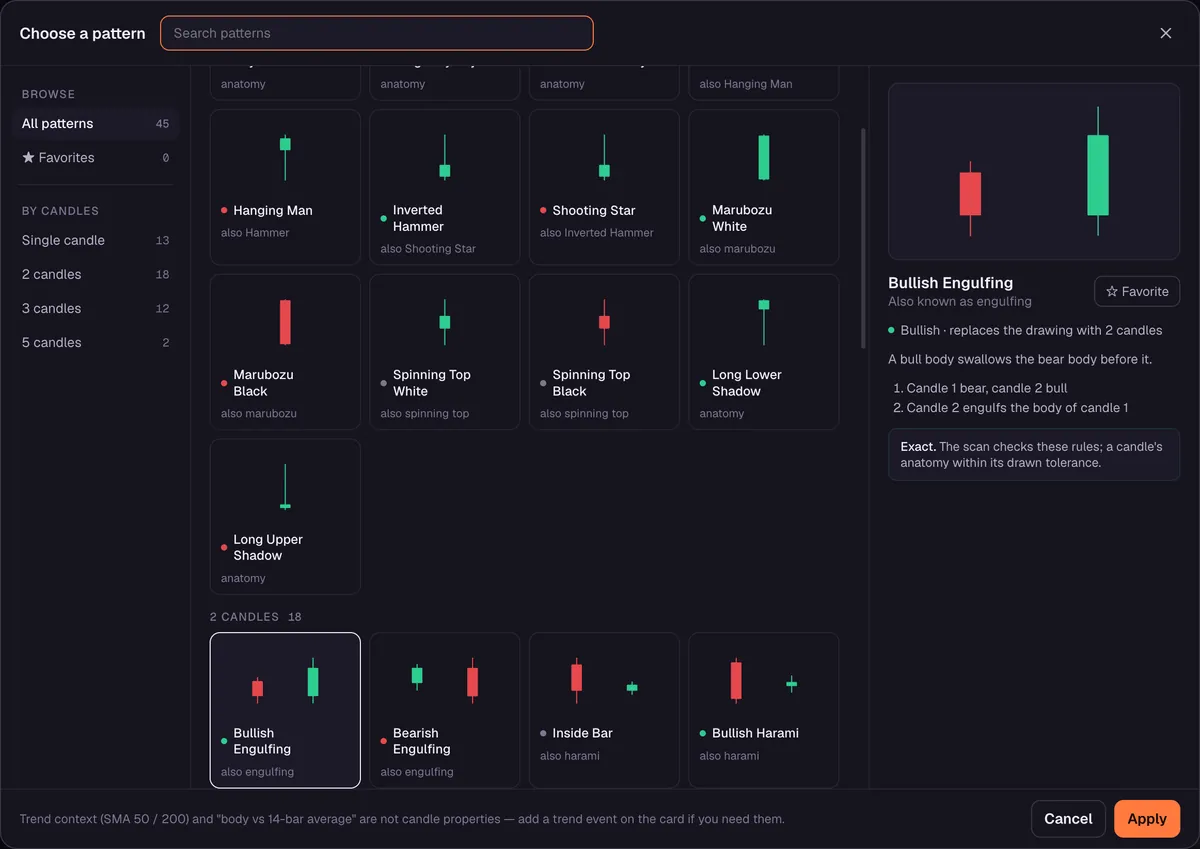
Draw your own pattern
Presets cover the shapes most traders already know, but a scanner is more useful when it also finds the shape you use. The Candle editor lets you draw a pattern of one to five candles and set the relations between them, such as one body covering another, one close sitting above another open, or a shadow longer than a body. Once saved, your pattern appears next to the presets and can be used as a Scan Events card condition in the same way.
If you build your own pattern, give it a name that says what the shape is. A name like “Inside bar after heavy candle” is easier to read in an alert, a month later, than “Pattern 3”.
Scan timeframes and markets
Candle patterns run on the same ten scan timeframes as the rest of Moolish, from 15M to 3M, across the 1,600+ crypto markets covered. A scan runs on one exchange at a time, Binance, Bybit or OKX, with Spot, Futures or both. A pattern is evaluated on a closed bar only. A Bullish Engulfing that looks complete at the 40th minute of an hour is not recorded until the bar closes, so a pattern that an alert reports does not vanish afterwards.
| Timeframe | What one candle represents | How the pattern is often used |
|---|---|---|
| 15M | A quarter of an hour of trading | A fast trigger, usually after a slower condition |
| 4H | A block of several hours | A middle step, or a pattern for active traders |
| 1D | A full day | A pattern read as a day’s verdict |
| 1W and slower | A week or more | Rare patterns that traders watch closely |
A pattern on a longer timeframe sums up more trading and more participants, so it is rarer and is generally treated as more meaningful than the same shape on a fast timeframe. Fast patterns are frequent and noisy. That is the reason many traders use them as the trigger card, with a slower condition on another card already narrowing the field.
A candle as the trigger card
On its own, a scan for Bullish Engulfing on the 15M returns a very long list, because the shape is common. The usual answer is to make the candle the trigger card of a Scan Events filter. In the standard example the candle is the third card: a Buy Setup 9 on the 1D, a High Volume or above on the 4H and a Bullish Engulfing on the 15M, joined with AND. A candle shape is a Scan Events condition only. It cannot be a step in Chains, which takes events.
To combine a shape with other conditions on a single candle, such as a break of resistance on heavy volume, see the System Candles guide.
| Card | Timeframe | Condition | Bar open (UTC) | Bar close (UTC) |
|---|---|---|---|---|
| 1 | 1D | Buy Setup 9 | 21 Oct 00:00 | 22 Oct 00:00 |
| 2 | 4H | High Volume or above | 22 Oct 08:00 | 22 Oct 12:00 |
| 3 | 15M | Bullish Engulfing | 22 Oct 14:30 | 22 Oct 14:45 |
The 15M candle that completed the match closed at 9.228. That bar opened at or below the previous bar’s close and closed at or above the previous bar’s open, which is the engulfing shape. This shows what the scanner detects. It does not say what price did next.
Choosing a pattern for a trigger card
The right pattern depends on what you want the card to say. The table pairs common intentions with presets. It is a starting point, not a recommendation.
| The card should show… | Presets to try |
|---|---|
| Buyers reversed the last bar | Bullish Engulfing, Piercing, Bullish Harami |
| A rejection of lower prices | Hammer, Dragonfly Doji, Long Lower Shadow |
| A three-bar turn | Morning Star, Morning Doji Star, Bullish Abandoned Baby |
| Sustained buying | Three White Soldiers, Marubozu White |
| Sellers reversed the last bar | Bearish Engulfing, Dark Cloud Cover, Bearish Harami |
| A rejection of higher prices | Shooting Star, Gravestone Doji, Long Upper Shadow |
| A pause before a move | Inside Bar, Doji, Spinning Top White, Spinning Top Black |
Set up a candle scan in Moolish
- Open Scan Events, add a card for the timeframe, and pick a candle pattern from the Candle editor’s presets, or one you drew.
- Choose the timeframe of the card, for example 15M, and its lookback.
- Choose the market scope: one exchange, with Spot, Futures or both.
- Run the scan to see which markets just closed a bar that completed the pattern.
- For fewer, more selective hits, add a slower card, such as a Buy Setup 9 on the 1D, joined with AND. Then save the filter as a preset and switch on its Telegram alert. Because the trigger is a shape, the alert arrives shortly after the bar closes. See Telegram alerts.
Common mistakes
- Treating a pattern as a prediction. A pattern describes the last few bars. It does not say what comes next.
- Scanning a fast pattern with no other condition. Common shapes on a 15M clock will match on a great many markets every day.
- Ignoring where the pattern appears. A Hammer after a long decline and a Hammer in the middle of a range are different observations. A preset checks the shape only, so add a trend event on another card if the context matters to you.
- Assuming every source defines a pattern the same way. Open the preset and read its relations.
- Forgetting the Disclaimer. Moolish detects conditions and gives no advice. Read the Disclaimer and Risk Disclosure.
FAQ
How many candlestick patterns does Moolish scan?
The Candle editor ships 45 presets, and you can draw your own patterns of one to five candles.
Which timeframes can I scan for candle patterns?
The ten scan timeframes: 15M, 4H, 1D, 2D, 3D, 1W, 2W, 3W, 1M and 3M.
Does the scanner detect a pattern before the bar closes?
No. Patterns are evaluated on closed bars, so a hit does not disappear when the bar finishes.
Can I scan for a pattern only after a TD Sequential signal?
Yes. Put the candle on its own card next to a Sequencer 9-13 signal card and optionally a Volume VSA card, joined with AND. The confirmation guide walks through it.
Do candle patterns predict price?
No. They describe what price did on the last few bars. Moolish does not predict price, and nothing it shows is financial advice.
Do I need to code to define a pattern?
No. You draw the candles in the Candle editor and set the relations between them.
Ask an AI to check this page