 Moolish
Guides
Ready-made candle setups for crypto: the 57 System Candles in Scan Events
Last updated:
Ready-made candle setups save you from building common conditions by hand. Moolish ships 57 built-in System Candles in the Scan Events picker. Some are pure shapes, and the rest join several conditions on one candle, such as a break of resistance on heavy volume. You can use a System Candle as it is, or duplicate it to get a copy you can edit.
What System Candles are
A Scan Events card holds the conditions for one timeframe. Open a card and the picker, titled something like “Events on D”, lists where those conditions can come from: My Candles, System, Webhooks, and every method you subscribe to, such as Volume VSA and Sequencer 9-13. My Candles are the ones you drew or duplicated. System holds 57 Candles that are built in.
The point of a System Candle is that it already says something specific. “Doji” says one shape. “Break resistance, Marubozu, high volume” says three things at once about the same bar. Instead of putting three conditions on a card and hoping you set their thresholds the way you meant, you pick one tile.
Of the 57, 36 are pure shape presets. The shapes are covered in the candlestick pattern scanner guide, so this page does not list them again. The other 21 are ready-made Candles that join conditions on one candle, and they are what the rest of this guide is about.
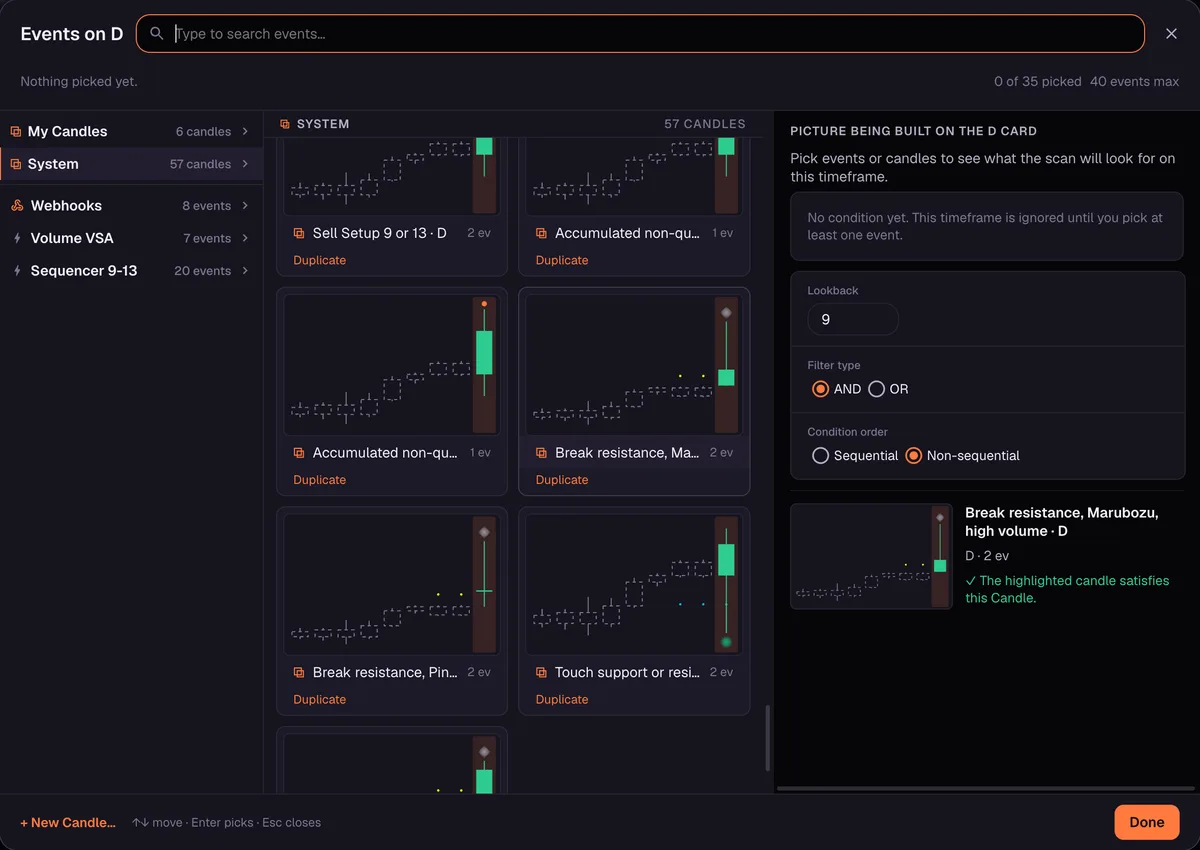
How to use one on a card
- Open Scan Events and add a card for the timeframe you care about, for example D.
- Open the card’s picker and choose System in the left column.
- Click a tile. Each tile shows a picture of the candle, and hovering a tile makes the panel on the right preview it and say “The highlighted candle satisfies this Candle.”
- Check the card settings. The default lookback is 9 candles, the filter type is AND or OR, and the condition order is Sequential or Non-sequential.
- Choose the market scope and run the scan.
A scan returns pairs. Each row shows the number of candles inside the lookback that matched and the time of the last match, with an “open” link that takes you to the chart.
To change a System Candle, press Duplicate on its tile. The copy lands in My Candles, where you can edit it. The System original stays as it was.
The ready-made families
The table lists the 21 ready-made Candles by family. Names are as they appear in the app, and “D and H4” means there is one Candle for each of those two timeframes.
| Family | Where | What it asks for |
|---|---|---|
| Break resistance, Marubozu, high volume | D and H4 | Break Resistance and volume at least High, on a bullish candle whose body is 70% or more of its range |
| Break resistance, Pinbar, high volume | D and H4 | Break Resistance and volume at least High, on a bullish candle whose body is at most 20% of its range and whose lower shadow is 55% or more of it |
| Strong break resistance | D and H4 | The break crossed two or more levels on the same candle |
| Strong break support | D and H4 | The break down crossed two or more levels on the same candle |
| Break resistance after touch | D and H4 | Resistance broken at a level that had been tested at least once before |
| Touch support or resistance | D and H4 | Either side was tested on this candle (OR) |
| Sell Setup 9 or 13 | D and H4 | The Sell Setup count reached 9 or 13 (OR) |
| Accumulated non-qualified buy and sell | D and H4 | A non-qualified Buy 13 (or Sell 13) arriving on top of nine or more accumulated ones |
| Volume 1.5x, 2x and 3x average or more | Any timeframe | A closed bar whose volume is at least 1.5, 2 or 3 times its 20-bar Wilder average |
Break resistance with volume
The two “high volume” Candles are the ones most traders look at first. Both ask for the same two facts about a bar: it broke a resistance level, and its volume graded High or better in Volume VSA, meaning High, Very High or Ultra High. They differ in the shape of the bar.
The Marubozu version wants a bullish candle with a long body, 70% or more of its range, so the bar went most of the way from low to high. The Pinbar version wants a bullish candle with a tiny body, at most 20% of the range, and a lower shadow of 55% or more of it. That is a bar that was pushed down and bought back up before it closed.
These Candles read two methods at once. The level comes from Sequencer 9-13 and the volume from Volume VSA, so both subscriptions have to be on your account for the Candle to evaluate. If one is missing, add the method first.
Strong breaks and touches
A plain break says price closed beyond one level. Strong break resistance and Strong break support ask for more: the break crossed two or more levels on the same candle. It is a way to separate a bar that nudged through a level from one that went through several.
Break resistance after touch is the Candle that cares about history. It wants the resistance to have been broken at a level that had been tested at least once before. The idea is general and easy to state: a level that price has already pressed on means more to many traders than a level it never visited.
Touch support or resistance is the loosest of the group. It is an OR of two conditions, support tested or resistance tested on this candle. Use it when you want to know which markets are sitting at a level right now, and tighten it with a second card if the list is long.
Sell Setup 9 or 13 and accumulated counts
Sell Setup 9 or 13 is true when the Sell Setup count reaches 9 or 13. It is an OR, and the two cannot happen on the same bar, so the Candle simply catches whichever one arrives. It is useful when you want both ends of a sell count on a single tile. For how the counts work, read the TD Sequential crypto scanner guide.
The Accumulated non-qualified Candles are for long runs. The Candle asks for a non-qualified Buy 13 arriving on top of nine or more accumulated ones, and the sell Candle mirrors it for Sell 13. Non-qualified counts are explained in the TD Sequential guide linked above.
Volume 1.5x, 2x and 3x average
These three Candles work on any timeframe. Each looks at a closed bar and asks whether its volume is at least 1.5, 2 or 3 times its average volume over the last 20 bars, a Wilder average. They give you plain multiples to use when a grade name is too coarse.
| Candle | Volume at least | Volume VSA tier it sits inside |
|---|---|---|
| Volume 1.5x average or more | 1.5 times average | High, which runs from 1.2 to 1.8 |
| Volume 2x average or more | 2 times average | Very High, which runs from 1.8 to 2.2 |
| Volume 3x average or more | 3 times average | Ultra High, which runs from 2.2 and up |
The multiples cut inside the tiers, so each one is a finer line than the grade it sits in. Use the tiers when you want the grade, and the multiples when you want a fixed line. The Volume VSA guide explains the grades.
A worked scan on real data
To see what a System Candle returns, take one tile and nothing else. The scan below used a single D card with Break resistance, Marubozu, high volume, Binance Spot and Futures, and a lookback of 9. It was run on 26 October 2026 and returned 10 results.
| Pair | Market | Matching candles | Last match |
|---|---|---|---|
| BULLAUSDT | Futures | 3 | 25 Oct |
| CAPUSDT | Futures | 1 | 25 Oct |
| IOSTUSDT | Spot | 5 | 25 Oct |
| JCTUSDT | Futures | 6 | 25 Oct |
| AVAUSDT | Spot | 4 | 24 Oct |
| BTRUSDT | Futures | 2 | 23 Oct |
| CVXUSDT | Spot and Futures | 4 | 22 Oct |
| DOODUSDT | Futures | 3 | 22 Oct |
| IOSTUSDT | Futures | 3 | 22 Oct |
| AVAUSDT | Futures | 2 | 19 Oct |
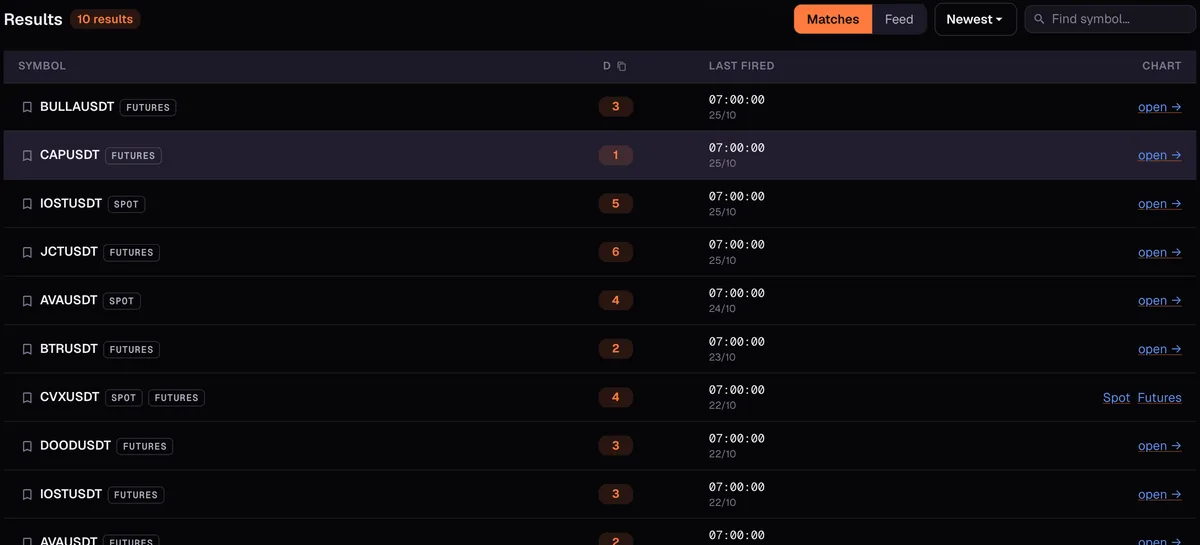
Read the table the way the app presents it. Each pair shows how many candles in the last nine daily bars matched, and when the last one was. IOSTUSDT on spot matched five times, CAPUSDT on futures once. The scan found these candles. It does not say what any of these markets did next.
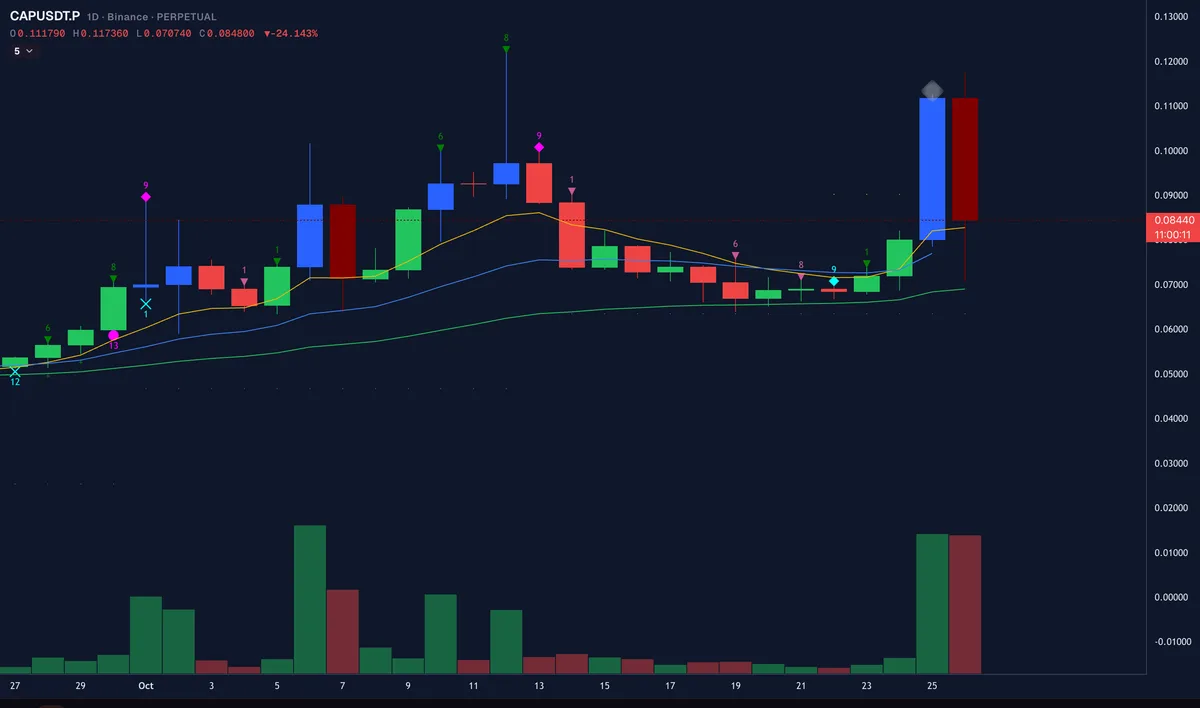
Take CAPUSDT, the single match. Its daily bar of 25 October 2026, opened at 00:00 UTC, was a tall bullish body drawn as a high-volume bar, closing above the dotted resistance near 0.089. Its volume bar is among the tallest of the month. The bar to its right is the next day, still forming when the picture was taken.
Combining a System Candle with other cards
One tile on one card returns a list that is often longer than you want to read. The usual next step is to add a card on another timeframe and join the two with AND. A System Candle on D can sit next to a Sequencer 9-13 signal on W, or a Volume VSA condition on H4. A System Candle sits on a card the same way as a Candle you drew yourself.
Two settings change the result. The lookback decides how many past candles may supply the match, with 9 as the default. The condition order decides whether the events you picked on a card have to happen in a sequence (Sequential) or in any order inside the lookback (Non-sequential). Start with the default and change one thing at a time. The custom alerts guide shows how a filter becomes a saved preset with a Telegram alert.
When to duplicate instead
A System Candle is a fixed definition. If its 70% body rule is not the Marubozu you mean, or you want a different volume multiple, duplicate it. The copy lands in My Candles and you edit it there. Name the copy so you can tell it apart a month later, for example “Break resistance, Marubozu, own body rule”.
Common mistakes
- Running a two-method Candle with one method. The break-resistance volume Candles read Sequencer 9-13 and Volume VSA. Both need to be on your account.
- Treating a match as a forecast. A match says a bar met the rule. It says nothing about the next bar.
- Reading the last-match time in your own time zone. A daily bar opens at 00:00 UTC. In a UTC+7 browser that shows as 07:00.
- Mixing up volume tiers and multiples. High Volume and “1.5x or more” are close but are not the same line.
- Skipping the disclaimer. Moolish detects conditions and gives no advice. Read the Disclaimer and Risk Disclosure.
FAQ
What are System Candles in Moolish?
They are 57 built-in Candles in the Scan Events picker. Use one as it is, or duplicate it to get a copy you can edit in My Candles.
How many of the System Candles are ready-made setups?
21 of the 57. The other 36 are pure shape presets, which the candlestick pattern scanner guide covers.
Can I change a System Candle?
Not in place. Duplicate it, and the copy lands in My Candles, where you can edit it.
Which timeframes do the ready-made Candles cover?
Most come as a D and an H4 Candle. The three volume-multiple Candles work on any timeframe.
Why does a break-resistance volume Candle need two subscriptions?
It reads two methods: Sequencer 9-13 for the resistance level and Volume VSA for the volume grade.
Do System Candles predict price?
No. A match says that a closed bar met the rule. Moolish does not predict price, and nothing it shows is financial advice.
Ask an AI to check this page