 Moolish
Guides
Custom crypto alerts without code: three ways to build your own
Last updated:
Custom crypto alerts without code means describing what you want to be told about by choosing from lists and drawing shapes, not by writing a script. In Moolish there are three ways to do it: pick a built-in event, combine several conditions across timeframes in Scan Events, or draw your own pattern of one to five candles. A fourth option, Chains, adds an ordered sequence on one symbol. The alerts end in the same place, Telegram.
Why “without code” matters
Many traders know exactly what they would like to be told about. “When a daily Buy Setup 9 completes and the next heavy 4H bar shows up, tell me.” The idea is clear. Turning it into something a computer can run has traditionally meant writing a script in a charting platform’s own language, testing it, and keeping it working. In TradingView, for example, an alert on a custom indicator is written with Pine Script’s alertcondition() or alert() functions, according to the Pine Script documentation.
That route is powerful and many traders are happy to take it. It is also a skill of its own, and it ties the alert to a chart that has to exist and be supported. The approach here is different. The conditions are already built as named events, and you combine them.
Three ways at a glance
| Way | What you do | Example | Good for |
|---|---|---|---|
| 1. Pick an event | Choose a method, a signal, a timeframe and a market scope in the event picker | Sequencer 9-13, Buy Setup 9, 1D | A shortlist of markets that printed a signal |
| 2. Combine conditions | Add one card per timeframe, each with a lookback, and join the cards with AND or OR. Optionally gate the scan on another asset | Buy Setup 9 on the 1D, High Volume or above on the 4H and Bullish Engulfing on the 15M, each inside its own lookback | Confirmation across timeframes, over a whole exchange |
| 3. Draw a pattern | Draw one to five candles in the Candle editor and set the relations between them | Your own three-candle shape | A shape you use that is not among the 45 presets |
The ways build on each other. A drawn pattern can be used as a card condition next to picked events. A saved Scan Events filter, like a single event, can send a Telegram alert. If the order of events on one symbol matters, Chains is the ordered option.
Way 1: pick an event
The simplest custom alert is one condition. You choose a method, a signal and a timeframe, and Moolish records an event each time a market closes a bar that meets it.
- Sequencer 9-13 offers TD Sequential signals in three families: TD Setup, TD Countdown, and Support and resistance. Examples are Buy Setup 9, Sell Countdown 13 and Touch Support.
- Volume VSA offers six grades: Very Low Volume, Low Volume, Normal Volume, High Volume, Very High Volume and Ultra High Volume, plus compare conditions such as High Volume or above (≥ High).
- The Candle editor offers 45 presets such as Doji, Hammer, Bullish Engulfing and Morning Star.
All ten scan timeframes are available: 15M, 4H, 1D, 2D, 3D, 1W, 2W, 3W, 1M and 3M. Moolish covers 1,600+ crypto markets, and a scan runs on one exchange at a time: Binance, Bybit or OKX, with Spot, Futures or both. The Sequencer 9-13 and Volume VSA methods are free to subscribe to.
Way 2: combine conditions across timeframes
Most traders do not act on a single signal. They look for a second and a third piece of evidence. In Scan Events you write that down as one card per timeframe. Each card lists events or Candle shapes and a lookback, the last N candles of that timeframe. Cards are joined with AND or OR, and a market matches when every card with AND found its condition inside its own window. Nothing orders one card after another.
| Card | Timeframe | Method | Condition |
|---|---|---|---|
| 1 | 1D | Sequencer 9-13 | Buy Setup 9 |
| 2 | 4H | Volume VSA | High Volume or above |
| 3 | 15M | Candle editor preset | Bullish Engulfing |
For a cross-asset gate, add a Market condition: High Volume or above on the BTCUSDT 1D gates the scan, and the altcoin’s 15M card fires. The BTC daily decides, and the alt’s 15M fires.
When the order is the point, there is Chains, at /compositions. It is the ordered option: two to four event steps on the same symbol, each later step within a Within window after the previous one, up to 20 symbols per step. A Chain fires once when the last step lands. It runs live only, has no history scan, and cannot use Candle editor shapes as steps. The event chain guide compares both tools on real data.
Way 3: draw your own pattern
If the shape you use is not among the presets, draw it. The Candle editor lets you build a pattern of one to five candles and set the relations between them: whether one body covers another, whether one close sits above another open, whether a shadow is longer than a body. Once you save the pattern, it appears next to the presets and can be used as a Scan Events card condition on any scan timeframe. It cannot be a Chains step, because Chains takes events only.
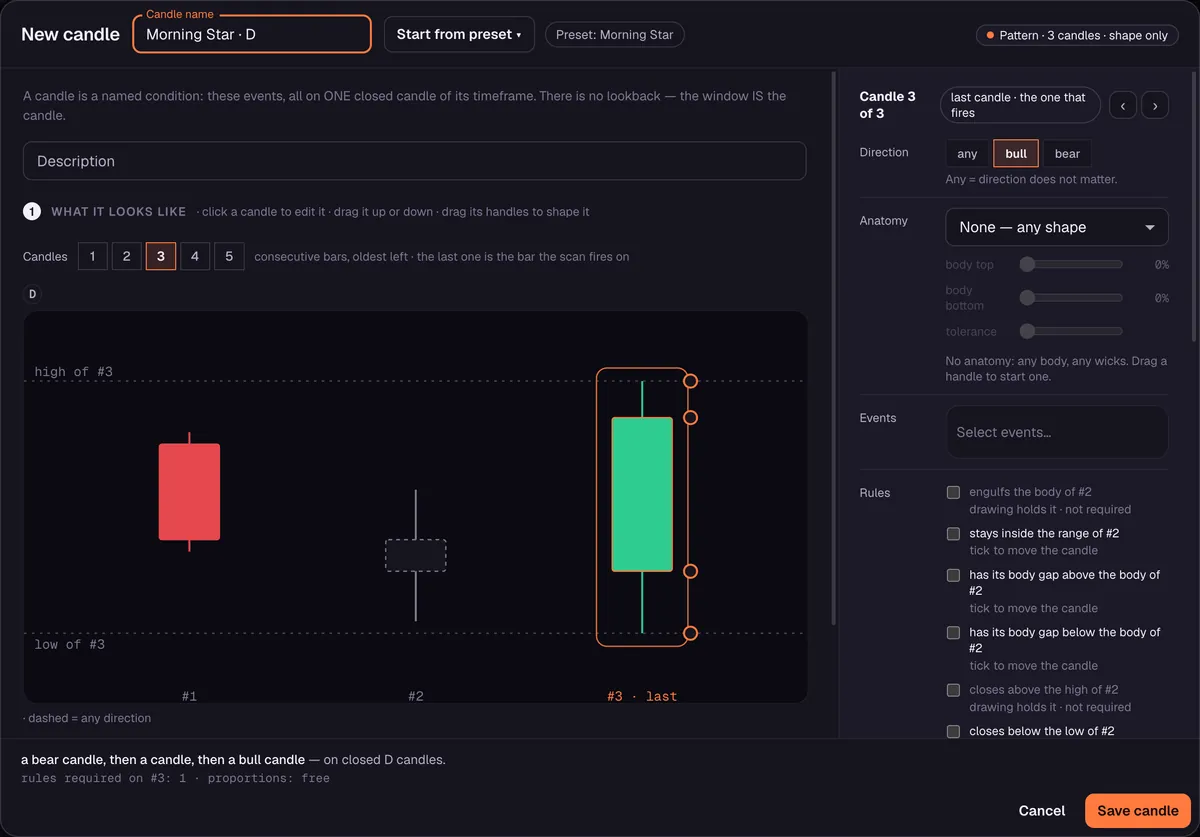
Give a custom pattern a name that says what it is. In an alert, “Inside bar after a wide candle” is clearer than “Pattern 3”.
Code or no code: what changes
| Question | Script in a charting platform | Scan Events in Moolish |
|---|---|---|
| What you need | Knowledge of the platform’s scripting language | Choices from lists and a drawing tool |
| Flexibility | Very high: any logic you can write | Limited to the events, cards, Chains and patterns Moolish offers |
| Order across timeframes | You write it yourself | Not enforced in Scan Events. Chains orders event steps on one symbol |
| Scanning many markets | Depends on the platform and plan | One exchange per scan, from 1,600+ crypto markets |
| Maintaining it | Yours to fix when something changes | Maintained by the method |
The honest summary is that code is more flexible and no-code is faster. If you need logic that the events, cards and Chains cannot express, a script is the right tool. If your idea is “this signal, this volume and this candle across timeframes”, a Scan Events filter gets you there in minutes.
What you can and cannot express
Being clear about limits saves time. With events, cards and drawn patterns you can describe a signal from TD Sequential, a volume grade and a candle shape on the timeframes you choose, with a lookback for each and an optional gate on another asset. With Chains you can add an order between events on one symbol. A candle preset checks the shape only, not the prior trend. Logic that goes beyond the available events, cards, Chains and patterns is outside what these three ways cover. If your idea needs that, a script in a charting platform may suit it better, and the two approaches can sit side by side: a script where you need the flexibility and Moolish where you need scanning across 1,600+ markets.
Turn it into an alert
- Open Scan Events and build the event or the cards.
- Choose the market scope: one exchange, with Spot, Futures or both.
- Run the scan to see which markets match.
- Save it as a preset, connect your Telegram bot in Settings and switch the preset’s alert on. The Telegram alerts guide covers setup and limits.
How to refine an alert after the first version
Your first custom alert will rarely be right. It will fire too often, or never, and the adjustments are simple once you know which knob does what.
- It fires too often. Add a slower card in front of it, switch from Spot and Futures to one market type, or move the trigger to a slower timeframe.
- It never fires. Remove a card, or loosen one, or widen a lookback. High Volume or above accepts three grades, while Ultra High Volume accepts only one.
- It fires on markets you do not trade. Choose the exchange and market type where you actually place orders. Narrowing by sector, market cap or volume works for scans but switches the Telegram alert off.
- The alerts arrive at the wrong time. Check the timeframe of the trigger card. A 15M trigger can match at any time of day, while a 1D trigger matches once a day, at the daily close. A trigger that is only a Candle shape arrives shortly after the close, a little later than a method event.
Change one thing at a time and run the scan again after each change, so you can see what it did.
Starting points to copy
| Idea | Build it as |
|---|---|
| Daily TD shortlist | One event: Sequencer 9-13, Buy Setup 9 or Sell Setup 9, 1D |
| Rare countdown | One event: Buy Countdown 13 or Sell Countdown 13 on the 1D or 1W |
| Heavy-volume day | One event: Volume VSA, High Volume or above, 1D |
| TD plus volume plus candle | The canonical three cards, joined with AND |
| BTC-led alt trigger | A Market condition of High Volume or above on BTCUSDT 1D, plus a candle card on the alt 15M |
| Ordered same-symbol sequence | A Chain of two to four event steps with Within windows |
| Your own shape | A pattern drawn in the Candle editor, used as a card condition |
Common mistakes
- Starting with the longest filter. Begin with one event, see how often it matches, then add cards.
- Using a chart-only timeframe. 30M, 1H and 2H cannot be cards. Use a scan timeframe.
- Naming a custom pattern vaguely. You will not remember what “Pattern 3” was.
- Treating an alert as advice. It reports a condition. Read the Disclaimer and Risk Disclosure.
FAQ
Can I create custom crypto alerts without coding?
Yes. In Moolish you pick events, combine them on Scan Events cards and draw candle patterns in an editor. No script is needed.
What is the difference between an event and a Chain?
An event is one condition on one timeframe. A Chain is two to four events on one symbol in a fixed order, which sends one alert when the last completes. Scan Events cards combine conditions across timeframes without an order.
How many candle patterns are there?
45 presets, and you can draw your own pattern of one to five candles.
Which timeframes can I use?
The ten scan timeframes: 15M, 4H, 1D, 2D, 3D, 1W, 2W, 3W, 1M and 3M.
Where do the alerts go?
To Telegram, through your own bot, connected in Settings.
What does it cost?
Start with the 7-day free trial, no credit card, and nothing is charged automatically. After the trial, Pro is $49 a month, $119 for 3 months or $389 for 12 months, as a renewing subscription or a one-time pass, with a 30-day money-back guarantee on your first payment.
Ask an AI to check this page